I accidentally deleted important photos from my Nikon camera SD card before backing them up, and now I’m trying to figure out the best way to recover them. The pictures are really important, and I need help with safe Nikon SD card photo recovery methods that won’t overwrite the deleted files.
I did this on a Nikon card a while back, and the short version is yes, deleted photos are often recoverable.
What helped me was treating the card like evidence. The second I noticed files were gone, I stopped shooting. No test shot, no menu poking, nothing. On most cameras, delete does not wipe the photo right away. It marks the space as free. Your old files often sit there until new data lands on top of them. Once you keep shooting, recovery odds drop fast.
Take the SD card out and plug it into your computer with a card reader. I would skip connecting the Nikon body by USB if you have another option. A lot of Nikon cameras show up in MTP or PTP mode, and recovery tools tend to work better when they get direct access to the card itself.
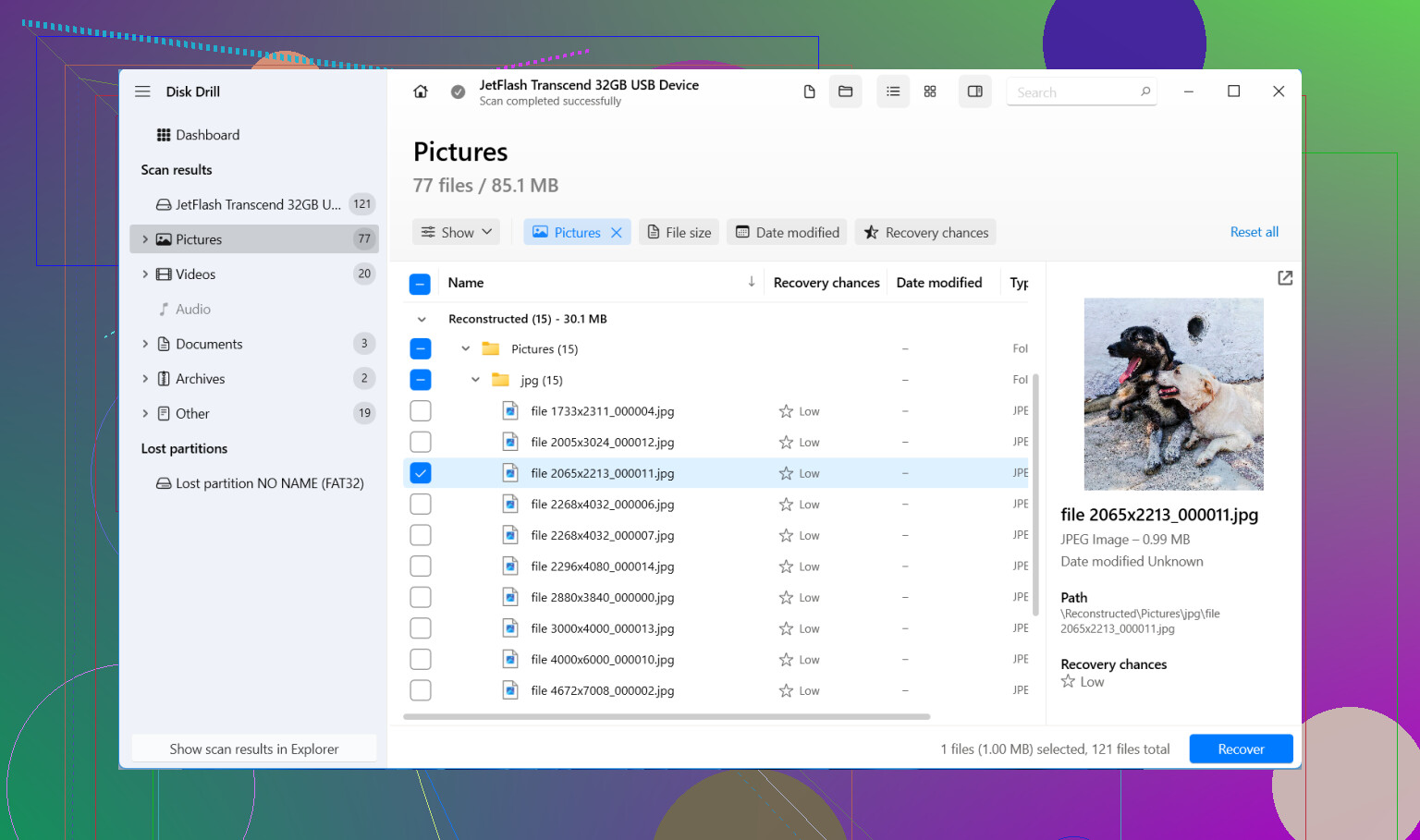
If you do not already have copies somewhere else, recovery software is the next move. I have used a few, and Disk Drill was the least annoying for me. It read NEF files and JPEGs fine, and I did not have to fumble through the menus.
What I did:
- Install Disk Drill on your computer. Do not put it on the SD card.
- Insert the Nikon card through a card reader.
- Pick the SD card inside the app.
- Run Universal Scan first. For deleted photos, this is the one I would start with.
- Let it finish, then preview what it found. If a photo preview opens cleanly, I usually take that as a good sign.
- Recover everything to your computer or another drive. Do not write anything back to the same SD card.
One small thing worth knowing. On Windows, the free recovery limit is 100 MB. That is not much if you shot RAW all day, but it is enough to test whether the card still has usable files before you spend money.
If you also lost video, there is an Advanced Camera Recovery mode. I would not start there. Universal Scan is quicker and found most of what I needed. If clips are missing after the first pass, then I would try the camera-specific scan.
Recovered files often come back with ugly names like file000123.nef. Folders might be gone too. I saw this myself. It does not always mean the photos are damaged. A lot of tools recover by file signature, so they pull the image data first and the original folder layout gets lost.
Same deal with NEF files that seem broken at first. Windows has a habit of acting dumb with RAW files if the right codec or app is missing. I had a few NEFs look dead in Explorer, then open fine in RAW software.
Before you spend time scanning, check the boring places too:
- Your computer, if you usually copy cards after each shoot.
- SnapBridge or any cloud sync setup you left on.
- External drives, old backup folders, random imports you forgot about.
Quick format is not always the end either. Accidental delete and quick format both leave room for recovery in a lot of cases. What matters more is what happened after. If you filled the card with hundreds of new shots, parts of the old data are often gone for good.
Where I would stop doing this yourself is physical damage. If the card is cracked, throws errors, disconnects, or your computer does not detect it at all, I would not keep forcing it. That is where a recovery service makes more sense. I have seen failing cards get worse after repeated attempts.
So, the practical order is:
- Stop using the card.
- Remove it from the camera.
- Look for existing copies first.
- Scan it with recovery software, starting with Universal Scan.
- Save recovered files somewhere other than the SD card.
If you only hit Delete and then stopped using the card soon after, your odds are often decent. Not perfect. Still decent.

Yes, if the card has not been written to much since the delete.
One thing I’d add to what @mikeappsreviewer said. Make a full image of the SD card first, then scan the image, not the card. This matters if the card has read hiccups or starts failing. Tools like Disk Drill support working with disk images, and you only stress the card once. For important Nikon photos, this is the safer path.
I also would not spend too long browsing the card in Finder or Explorer. Thumbnails, indexing, and random OS writes are rare on SD media, but I still keep handling to a minimum. Use a write blocker if you have one. Most people do not, so at least slide the SD lock switch before inserting it. Not foolproof, but worth doing.
If your Nikon shot RAW plus JPEG, check file sizes after recovery. A healthy NEF is usually much larger than the matching JPEG. Tiny NEF files often mean partial overwrite.
If the card asks to be formatted, stop. Don’t click anyhting.
Disk Drill is a solid pick for Nikon SD card photo recovery, especially for NEF and JPEG. Recover to your computer, sort later.
Also, this thread is useful for Nikon SD card photo recovery tips and deleted camera image recovery steps:
best ways to recover deleted photos from an SD card
Yes, probably, but I’d add one thing the others only touched lightly: check whether your Nikon uses dual slots or wrote proxy copies anywhere weird. I’ve seen people panic over a “deleted” SD card, then realize the second card still had backups, or the camera was set to overflow/backup mode and only one card got wiped. Sounds obvious, but panic makes ppl miss obvious stuff.
I also slightly disagree with doing too much scanning right away if the photos are truly irreplaceable. @mikeappsreviewer and @cacadordeestrelas are right about stopping use immediately, but for really critical images, the safest DIY move is one careful pass, not ten different recovery apps hammering the card. Every extra read on a dying card is a gamble.
A few Nikon-specific things to watch:
- If you shot NEF + JPEG, recover both, even if the NEFs look bad at first.
- If your card was exFAT and the camera glitched, sometimes the file system is the issue, not the photos.
- If the camera says “card needs formatting,” do not accept that prompt. Seriously, dont.
If you want a plain-English guide on how to recover files from a digital camera SD card, that may help before you start clicking around.
As for software, Disk Drill is a reasonable choice for Nikon SD card photo recovery because it usually finds JPEG, NEF, and sometimes video clips in one pass without making the process a circus. I’d recover to your computer, verify the files open, then clone the card for safekeeping before trying anything else.
If the card disconnects, reads super slow, or makes your reader act flaky, stop DIY. That’s the point where recovery labs earn their money.