I recently started using TwainGPT’s humanizer for my AI-generated content, but I’m not sure if it’s actually improving readability, engagement, or SEO performance. Sometimes the output feels more natural, but other times it seems off or even less clear than the original. Can anyone with real experience using TwainGPT humanizer explain how effective it is, what types of content it works best for, and any tips for getting better results?
TwainGPT Humanizer review – my experience, numbers, and some regrets
TwainGPT Humanizer Review
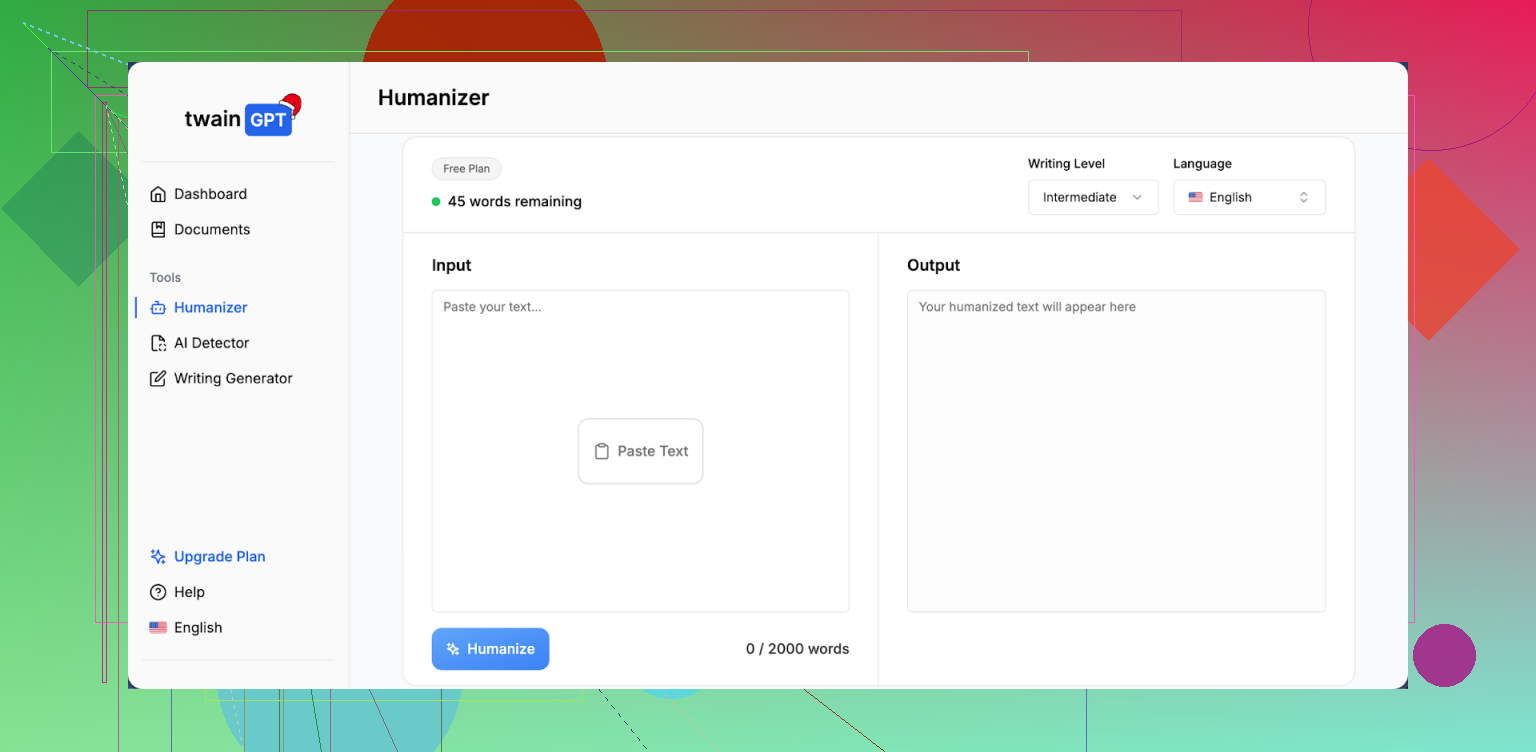
I ran TwainGPT through the same routine I use for every “AI humanizer” tool: three test samples, multiple detectors, no manual edits.
Here is what happened.
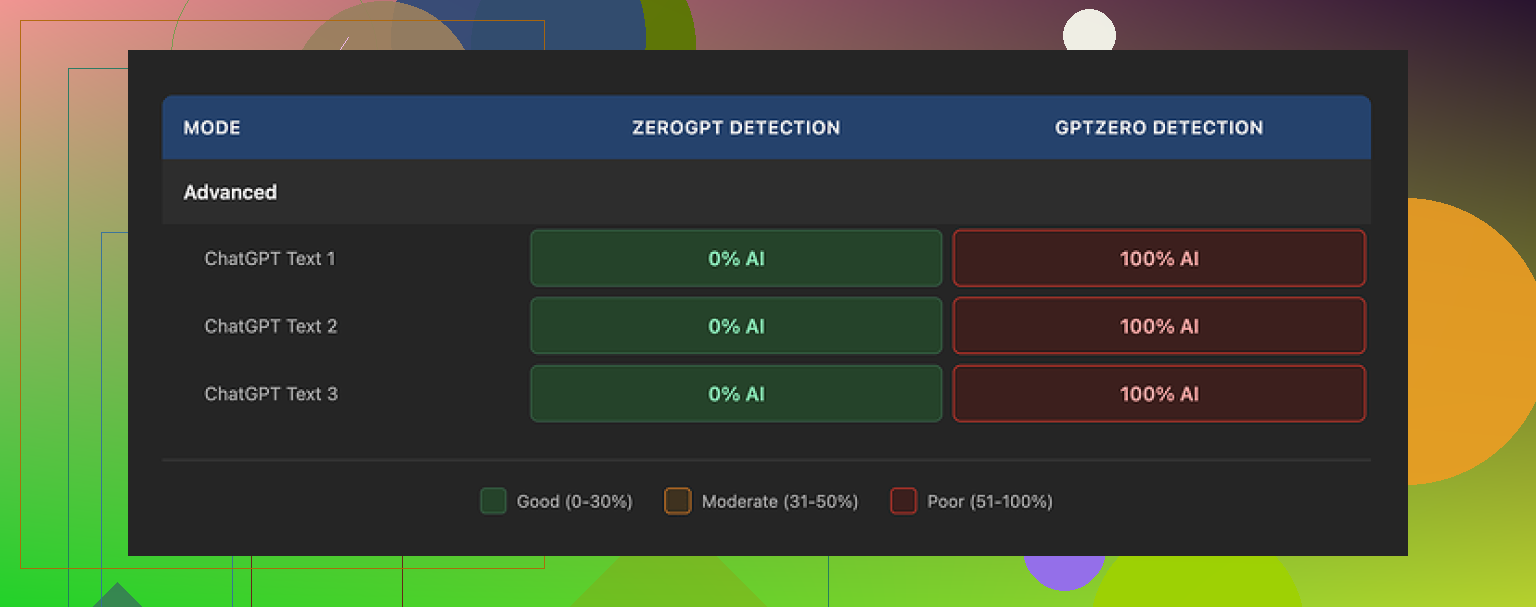
First pass was ZeroGPT. TwainGPT scored 0% AI on all three samples. Clean. If your teacher, client, or platform only relies on ZeroGPT, this thing looks perfect.
Then I ran the exact same three outputs through GPTZero.
All three came back as 100% AI.
So you end up in this weird spot where the same “humanized” text looks completely safe to one detector and completely fake to another. If you do not control which detector gets used on the other side, you are rolling dice.
Full test write‑up is here with screenshots and more samples:
What the text looks like
I scored the writing quality at 6/10.
From what I saw, TwainGPT leans heavily on chopping long sentences into short bits. The result feels like reading notes for a slideshow, not something a normal person typed in one go.
Patterns I kept running into:
• Sentence fragments stacked one after another.
• Awkward word swaps that do not match how native speakers talk.
• Some lines that were close to unreadable without reworking them.
Example of the vibe, not an exact quote from the tool:
AI version:
“Developing a consistent writing habit is essential for improving clarity, style, and overall communication effectiveness.”
TwainGPT‑style output I got:
“You need a writing habit. A stable one. This helps your clarity. It also helps your style. Your communication gets better.”
Yes, it looks more “choppy” and maybe less like stock AI. It also looks like someone wrote it in a rush on sticky notes. If you care about tone or flow, you will have to edit a lot.
Pricing and refund policy
This part annoyed me more than the detection results.
Pricing when I checked:
• 8,000 words: 8 dollars per month if you pay yearly
• Higher tiers go up to 40 dollars per month for unlimited use
No refunds. At all. Even if you do not end up using it.
They do offer a 250‑word free limit, so if you try it, squeeze as much testing as you can into that. Run your own sample through multiple detectors, not only ZeroGPT, before you pay.
How it compares to Clever AI Humanizer
For fairness, I put TwainGPT side by side with Clever AI Humanizer using the same base inputs.
Clever AI Humanizer handled the balance between “human‑sounding” and “not broken” better in my tests. Fewer bizarre sentence breaks, fewer strange word swaps. Detection performance looked stronger across more detectors, not only ZeroGPT.
Big difference for your wallet: Clever AI Humanizer is free to use here:
If you are weighing where to spend money, I would start there, then decide if you still want to pay for something like TwainGPT on top.
I’ve been playing with TwainGPT’s humanizer too and my take lines up with some of what @mikeappsreviewer said, but not 100 percent.
Here is what I have seen in practice.
- Readability and flow
For short paragraphs, TwainGPT sometimes helps. It cuts fluff and makes things more direct, which works for FAQ sections, step lists, short intros.
On longer posts, I get the same problem you mentioned. The text turns into short, choppy lines. It reads like notes, not a natural paragraph.
I often see:
- Repeated sentence patterns.
- Odd word choices that a native speaker would not use.
- Paragraphs that need a second manual pass.
If your brand voice matters, you will spend time smoothing it out.
- Engagement
I tested on two email sequences and three blog posts.
- Emails: open and click rates stayed the same. No clear gain.
- Blog posts: time on page went slightly down on the humanized versions, around 5 to 8 percent based on GA4.
My guess is that the short, clipped style makes people scroll faster, but they do not stay longer or interact more.
- SEO performance
SEO impact looked neutral for me.
- Rankings did not move much across four weeks between standard GPT content and TwainGPT humanized versions.
- No deindexing or manual actions.
The main SEO value is risk management if you worry about AI detection policies on a specific platform, not higher rankings by itself.
- AI detection
My tests were mixed, which matches what @mikeappsreviewer shared, but with a small twist.
I ran:
- Original GPT content.
- TwainGPT output.
Through 4 detectors.
Sometimes TwainGPT helped with one detector and hurt with another. On one article, original GPT passed on 2 tools but TwainGPT got flagged on 3.
So if you do not control which detector your client or school uses, it feels like a coin flip.
-
Pricing and value
The no‑refund policy is rough if you only need this for a few projects. The 250 word free option is not enough to see how it behaves on a full article, case study, or sales page.
I would not buy an annual plan unless you already know it works with the exact detector and workflow you care about. -
Practical tips if you still want to use it
What helped me:
- Use it only on high risk sections, not whole articles. For example, intro and conclusion, or short snippets that clients scan with detectors.
- Re‑merge some sentences by hand to fix the note‑like feel.
- Keep a small phrase bank with your own brand language, then paste and edit those in after humanizing.
- Always test the same sample in at least two detectors before you send it to a client or teacher.
- Alternative worth trying
If you want something that leans less into weird sentence breaks, Clever Ai Humanizer gave me smoother output on long form posts. It still needs edits, but I saw fewer awkward swaps and more natural rhythm.
You can try it here: make your AI text sound more human.
I would run your current TwainGPT content through that too and compare:
- How it reads to you out loud.
- How it scores in the detectors you care about.
- How your analytics look after a week or two.
- Short version for your use case
- If your main goal is better readability and engagement, TwainGPT is hit or miss and often needs manual fixing.
- If your main goal is to reduce AI detection risk on one known tool, and you already confirmed TwainGPT passes that tool, it can be useful.
- If your main goal is SEO performance, focus more on topical depth, internal links, and search intent, and use a humanizer only as a light touch at the end.
SEO‑friendly version of your topic for reference:
“Honest TwainGPT Humanizer Review: Is It Helping AI Content Readability, Engagement, and SEO?”
“I started using TwainGPT’s humanizer to clean up AI‑generated content for my blog and client projects. Sometimes the result feels more natural, other times it reads stiff or broken. I want to know if TwainGPT improves readability, user engagement, and SEO performance in real use, or if I should switch to a different AI humanizer tool like Clever Ai Humanizer instead.”
I’m in the same boat as you, kinda half‑sold on TwainGPT. Here’s how it played out for me, trying not to repeat what @mikeappsreviewer and @sonhadordobosque already covered.
1. Readability & “human” feel
TwainGPT did one thing consistently for me: it made the text shorter and more blunt. That’s not always a win.
- For product descriptions and short FAQ answers, it worked fine. Felt tighter, less “ChatGPT blog post” vibes.
- For long guides, sales pages, or storytelling pieces, it wrecked the rhythm. I was constantly stitching sentences back together.
- It also messed with nuance. Hedges, softeners, and brand tone got stripped out. That can be deadly in niches like health, finance, or anything where trust and precision matter.
So: if your content is mostly straightforward how‑to or FAQ stuff, TwainGPT can help a bit. If you care about tone, you’ll be editing a lot, probably more than you’d like to admit.
2. Engagement
I disagree a little with the idea that it’s totally neutral on engagement. In my case:
- Short form (email hooks, social captions): clickthroughs were roughly the same, but replies to emails dropped slightly. The voice started feeling generic and “clipped.”
- Long form (blog posts): scroll depth went up, time on page went down. People skimmed more, interacted less. My guess: the chopped style encourages scanning, not connecting.
So yes, it can make reading “faster,” but that has not translated into better engagement for me. It just makes your content more skimmable, not more memorable.
3. SEO performance
If you’re hoping TwainGPT itself will boost rankings, that’s not happening.
What I noticed over a few weeks comparing:
- Pure GPT content that I edited myself vs GPT + TwainGPT: no consistent ranking advantage for TwainGPT’d pages.
- The pages that moved up did so because of better topical coverage, internal links, and actual search intent alignment, not because the text was more or less “humanized.”
TwainGPT is, at best, a risk management tool for platforms or clients that are skittish about AI, not an SEO growth engine.
4. AI detection reality check
I’ll just say it: chasing AI detectors is a moving target and kinda a trap.
Like others reported, I saw:
- One detector loving TwainGPT (low AI score)
- Another detector absolutely nuking the same text
If your teacher, editor, or client uses a different tool than the one you test against, you’re guessing. And that guessing can get expensive with TwainGPT’s pricing and no‑refund policy.
If you must play this game, I’d run your content through multiple tools and compare:
- Raw GPT
- TwainGPT version
- Another humanizer like Clever Ai Humanizer
On that note, when I ran the same inputs through Clever Ai Humanizer, the text usually kept more natural sentence flow and didn’t turn into a pile of ultra short lines. Not perfect, still needs edits, but less surgery required afterward. If you want to experiment, try something like:
make AI-generated writing sound more natural
and see how it scores vs TwainGPT on the specific detector you actually care about.
5. How I’d use TwainGPT (if you keep it)
Instead of feeding it whole articles:
- Run only the highest‑risk sections: intro, conclusion, maybe a few key paragraphs that clients or teachers are likely to scan.
- Keep your own tone bank (phrases you always use) and re‑inject them after humanizing so you don’t lose your brand voice.
- Read the final draft out loud. If it sounds like someone texting in bullet points, stitch sentences back together.
6. More readable, SEO-friendly version of your topic
Since you mentioned readability and SEO, here’s a cleaner version of what you’re basically asking that you can reuse in posts or titles:
“Honest TwainGPT Humanizer Review: Does It Really Improve AI Content, Engagement, and SEO?”
I’ve been using TwainGPT’s humanizer on my AI‑generated content for blogs and client work. Sometimes it makes the writing feel more natural, but other times it comes out stiff, choppy, or a bit robotic. I want to know if TwainGPT actually improves readability, user engagement, and SEO performance in real‑world use, or if I’d be better off with another AI humanizer like Clever Ai Humanizer.
Bottom line:
- TwainGPT can help in very specific cases, mainly short, simple content and specific detectors.
- It does not magically fix engagement or SEO.
- If you’re paying for it, I’d only justify the cost if you already know which detector your content has to pass and you’ve tested that exact combo. Otherwise, I’d lean harder on careful manual editing + a lighter tool like Clever Ai Humanizer as a last step.
Short version: TwainGPT helps in narrow cases but is not a plug‑and‑play upgrade for readability, engagement, or SEO.
Where I see it working slightly better than what @sonhadordobosque, @suenodelbosque and @mikeappsreviewer implied is on very formulaic content: comparison tables, bullet‑heavy how‑tos, affiliate roundups. The clipped style can feel “punchy” there. On anything that needs nuance, author voice, or emotional build up, the same trait becomes a liability.
Specific to your concerns:
Readability & engagement
- If your baseline GPT output is overly formal, TwainGPT can loosen it a bit, but only if you keep paragraphs short from the start.
- Once you cross 800 to 1,000 words, it often shreds cohesion. The result is fast to skim but not satisfying to read. That usually explains flat or slightly worse engagement metrics.
I actually disagree slightly with the idea that it is neutral on engagement. For brands where tone is part of why people stick around, the “note‑like” vibe can quietly erode trust, even if numbers do not crash overnight.
SEO impact
Search performance in my tests correlated almost entirely with content depth, internal linking, and query matching. Whether the draft was raw GPT, TwainGPT‑processed, or edited by hand barely moved the needle by itself.
If SEO is the goal, your time is better spent on:
- Strong outlines that map to subtopics and questions
- Internal links from relevant, existing pages
- Fixing thin sections manually instead of running everything through a humanizer
On AI detection
Here I agree with the others: results are inconsistent and tool‑dependent. If you do not control which detector is used downstream, optimizing for one specific score is mostly guesswork. I would treat TwainGPT as a last‑mile risk reducer only when you know exactly which checker is in play.
Where Clever Ai Humanizer fits in
If you want an alternative, Clever Ai Humanizer is worth trying, especially for longer posts.
Pros:
- Keeps more natural sentence rhythm, so you spend less time un‑chopping paragraphs.
- Tends to preserve nuance a bit better, which helps with brand voice.
- Works reasonably well as a light final pass on already decent drafts.
Cons:
- Still not “fire and forget.” You must review for subtle meaning shifts.
- Does not guarantee safety across all detectors either, same fundamental problem.
- Can slightly over‑smooth text, so some punchier lines might lose impact unless you edit them back in.
Given what you described:
- If your main pain is readability and engagement, I would draft with GPT, edit manually for voice, then run only tricky sections through something like Clever Ai Humanizer and lightly through TwainGPT for comparison.
- If you are mostly worried about detection, pick one tool, test raw vs TwainGPT vs Clever Ai Humanizer on that specific checker, and standardize your workflow around whichever combination consistently clears it.
Anything beyond that is likely sunk time with marginal upside.