I’m looking for a genuinely free AI text humanizer that works as well as Writesonic’s AI Humanizer, but without strict word limits, mandatory signups, or hidden paywalls. I write a lot of AI-assisted content and need something that can reliably bypass AI detectors while still sounding natural for blogs and social media. I’ve already tried a few tools that either over-simplify the text, introduce errors, or get flagged as AI anyway. Can anyone recommend trustworthy free alternatives, or share real experiences with tools that actually work long term?
1. Clever AI Humanizer Review
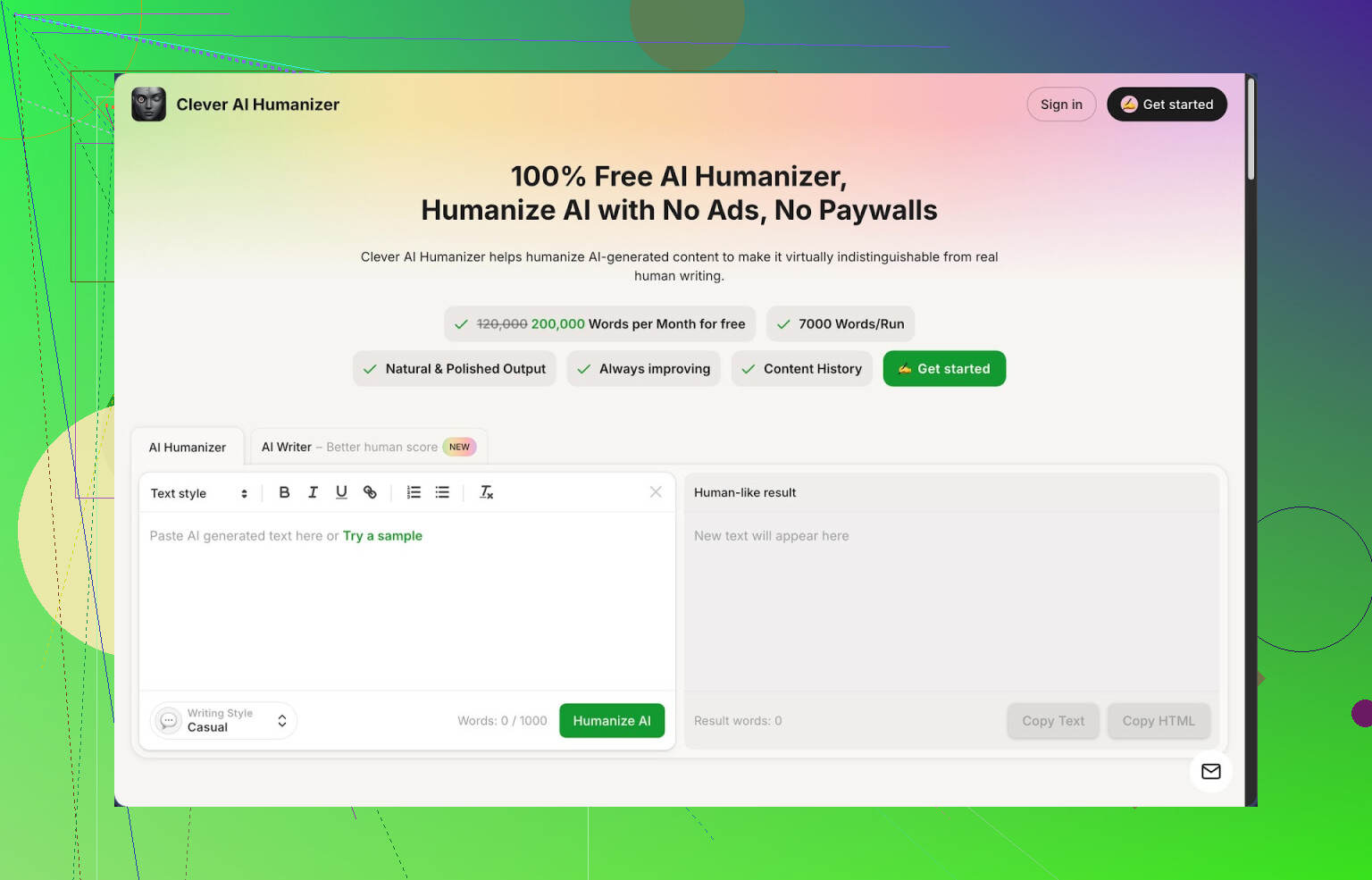
I stumbled into Clever AI Humanizer after getting tired of watching my AI-written stuff get flagged as 100% machine text over and over. I write a lot with AI, long form and short, and the pattern was always the same: detector says “AI,” client gets nervous, I waste time rewriting by hand.
This tool ended up staying open in my browser longer than I expected, mostly because it does not hide everything behind a paywall. You get around 200,000 words per month for free, up to about 7,000 words per run, and you do not have to babysit some tiny credit counter. For casual use and even light professional work, that is a lot.
It has three simple styles: Casual, Simple Academic, and Simple Formal. Nothing fancy, but enough for emails, blog posts, school work, and basic business writing. The part that surprised me is how well the Casual style handled AI detection. I tested three different samples through the tool, then ran the outputs through ZeroGPT. All three came back as 0% AI there. That does not mean it will pass every detector, but it is better than most tools I tried in the same afternoon.
Let me walk through how I used it and what broke, what worked, and what felt off.
Main tool: Free AI Humanizer
The main thing you will use is the humanizer module. You paste your AI output into a box, pick a style, hit the button, and wait a few seconds. That is it. No sliders, no advanced configs. I dropped in pieces between 800 and 3,000 words and it handled them fine, no error messages.
Here is what I noticed:
- It changes sentence structure more than word choice. That helps with detectors, since many of them look for patterns in rhythm and repetition.
- Meaning stayed close to the original text. I checked paragraphs line by line and did not find missing points or added nonsense.
- Readability improved a bit, especially for AI text that sounded stiff or generic.
It did increase length. A 1,000 word article ended up around 1,200 to 1,300 words after humanizing. If you are on a strict word limit for an assignment, you will have to trim after the rewrite. For blogging or email work, the size bump did not bother me.
Integrated tools I ended up using
The site is not only a humanizer. It has three extra tools on the same interface, and I did test all of them with real tasks.
Free AI Writer
This is the “start from nothing” module. You give it a prompt and it writes an essay or article for you, then you run that through the humanizer in the same flow. I tried:
- A 1,500 word “how to” guide
- A simple comparison article for two products
- A short opinion piece
The trick here is that outputs generated directly inside their system seemed to get better human scores after humanization than texts I copied in from other AIs. Hard to say why, but my ZeroGPT checks were more often 0% AI with their built-in writer plus humanizer combo compared to outside AI plus humanizer.
If you like to do everything in one tab, this combo helps. I still edited heavily, but the detector stress dropped.
Free Grammar Checker
This part is simple. You paste your text and it fixes spelling, punctuation, and some clarity issues. I ran:
- One messy email full of typos
- A long article with no paragraph breaks
- A lightly edited AI piece
It cleaned the obvious issues. It is not as picky as tools like Grammarly, but it made the text safe enough to send to a client or publish on a smaller blog. I mostly used it after humanizing, as a final pass, so I would not miss silly errors.
Free AI Paraphraser
This one rewrites your text without changing the main idea. I used it in three ways:
- Rewriting old blog posts to reuse for a newsletter
- Changing tone of a product description from stiff to more casual
- Updating a draft that sounded too close to a source article
Paraphraser output stayed on topic and did not invent new facts, at least in my tests. For SEO work and draft cleanups, it helped shorten or reframe paragraphs. I would not trust it blindly for technical content, but for normal web content it did the job.
How it fits into a daily workflow
Once I got used to it, my flow looked like this:
- Use my usual AI tool to draft content, or use Clever AI’s own writer if I am feeling lazy.
- Paste into Clever AI Humanizer, pick Casual or Simple Academic, and run it.
- Check the output for meaning and tone. Fix anything weird manually.
- Run the final text through their Grammar Checker for a quick cleanup.
- Spot check with an AI detector if the client cares a lot, especially on high risk platforms.
The biggest advantage is not having to think about word limits. At 200,000 words monthly and 7,000 words per run, I did not hit a wall in normal use. Most similar tools start yelling about credits after two or three long articles.
What is not perfect
It is not magic. Some issues I hit:
- Certain detectors still flagged parts of the text as AI. Different detectors use different models, and no tool passes all of them in every case.
- Output sometimes felt slightly bloated. Extra phrases, softer wording, longer sentences. You might have to tighten paragraphs if you prefer compact writing.
- Styles are basic. If you need creative voice or niche tones, you still have to edit by hand.
Still, given the price tag of zero, it became my default free option. I have paid for other tools that did not do better in real tests.
Extra links and deeper tests
If you want to see a more detailed test with AI detection screenshots and step by step results, there is a longer review here:
https://cleverhumanizer.ai/community/t/clever-ai-humanizer-review-with-ai-detection-proof/42
Video breakdown is here, if you prefer watching someone walk through it:
Clever AI Humanizer Youtube Review https://www.youtube.com/watch?v=G0ivTfXt_-Y
If you want to see what other people on Reddit are saying about AI humanizers, these threads helped me benchmark it against other tools:
Best Ai Humanizers on Reddit https://www.reddit.com/r/DataRecoveryHelp/comments/1oqwdib/best_ai_humanizer/
All about humanizing AI https://www.reddit.com/r/DataRecoveryHelp/comments/1l7aj60/humanize_ai/
If you write with AI a lot and you are tired of rewriting the same robotic patterns by hand, this is one of the few free tools I would keep bookmarked.
I get why you are hunting for “Writesonic level” stuff without the traps. Short answer for your exact filters (no hard word caps, no signup, no paywall at all): there is no perfect clone. Every serious humanizer either throttles words, wants an email, or nudges you to paid.
That said, here is what is closest and how to work around limits.
- Clever Ai Humanizer
I agree with a lot of what @mikeappsreviewer said, but I do not buy the “set and forget” story for detectors. Detectors differ a lot. Some flag even human content.
Pros for your use:
• Around 200k words per month on the free plan, about 7k per run
• Output keeps meaning close and reads more natural
• Three tones are enough for most client work
• Strong if you do long form with AI then polish
Cons:
• You still need an account for consistent usage
• Occasional bloat in word count, you will need to trim
• Does not beat every detector, you still need to spot check
Realistic workflow if you write heavy:
• Draft with your usual AI
• Humanize in Clever Ai Humanizer in 1–3 chunks for long articles
• Manually tighten long sentences and remove filler
• Run one detector your client trusts, not five different ones
- Mix of free tools instead of a single “magic” humanizer
If you refuse signups and hard limits, you need a stack, not one tool.
Example stack:
• Pass 1: Simple paraphraser with no login. Short chunks of 300 to 500 words.
• Pass 2: Manual edits to vary sentence length, add small personal comments, and change openings.
• Pass 3: Free grammar checker to clean things.
This takes more time, but it avoids hard caps and logins. It also makes the text look less uniform, which detectors often like.
- Set expectations with clients
Unpopular take. Chasing 0 percent AI on every detector wastes time. Detectors mislabel content a lot. Better approach:
• Aim for “mixed” or “likely human” instead of 0 percent
• Keep a record of your edits and drafts
• Tell clients you use AI as a helper and you rewrite and fact check
For what you want, Clever Ai Humanizer is the closest to “Writesonic level, but actually usable at scale” right now. It is not magic and it does not meet your “no signup ever” wish, but for high volume AI assisted writing, it hits the practical sweet spot.
Short version: what you want exists partially, but not in the neat “Writesonic quality, no signup, no caps, no paywall” combo. Something’s always gotta give.
I’ll push back a bit on both @mikeappsreviewer and @stellacadente on one thing: if you’re writing a lot of AI‑assisted content, “no signup ever” is honestly hurting you more than helping. The tools that are strong enough to consistently reshuffle structure, vary syntax, and not mangle meaning tend to need accounts just to keep abuse under control.
That said, here’s what actually works in practice:
-
Clever Ai Humanizer as the core
Yeah, both of them mentioned it, but for your exact use case it is the closest thing to a Writesonic-style AI humanizer that is still sane to use at scale.What it actually nails compared to most “AI humanizer” junk:
- Sensible free tier: ~200k words/month, ~7k per run
- Humanization focuses on structure & rhythm, not just thesaurus swapping
- Meaning drift is pretty low, so you are not constantly re-fixing facts
Where I disagree slightly with the others:
- I would not rely on “0% on ZeroGPT” as a benchmark for quality. Detectors are inconsistent, and optimizing hard for one detector is how you end up with weird, bloated prose.
- Instead of chasing 0%, I’d aim for: “Does this read like how I actually talk to my audience?” and then use detectors only as a sanity check when a client insists.
-
If you really want “no-login” options
You are not going to get Writesonic-level polish with no login, no caps, no paywall. What you can do is fake a humanizer by stacking lighter tools:- Pass 1: Run text through a basic free paraphraser that does not need an account, but only in small blocks (200–400 words).
- Pass 2: Manually inject human signals:
- Add 1–2 short asides or opinions per section.
- Vary paragraph length.
- Break a few sentences into fragments or questions.
- Pass 3: Toss it through a separate grammar / clarity checker to catch the junk your edits introduced.
It is slower than Clever Ai Humanizer, but if your priority is “no login under any condition,” that is the only realistic path.
-
Why a solid humanizer will always feel a bit bloated
Everyone complains that these humanizers make text longer. That is not just bad engineering.- Detectors often flag very compressed, super-consistent structure.
- To look human, the model introduces detours, qualifying phrases, more connective tissue.
If you want tight academic or strict word limits, you will almost always have to trim after humanization. That is normal, not a bug.
-
Practical setup I would use in your position
Since you say you write a lot with AI:- Accept a login for something that is actually useable at volume. Clever Ai Humanizer fits that niche way better than most.
- Use it primarily in “Casual” for general content, “Simple Academic” when you need it to sound a bit more structured.
- After humanizing, do a fast human pass where you:
- Cut obvious filler.
- Add 1–2 real personal bits per article (an example from your own experience, a small rant, a caveat).
- Only run the text through the same AI detector your client cares about. Don’t torture yourself across 5 different ones.
-
Hard truth no one likes to say
You will not find a truly unlimited, no-signup, no-paywall, Writesonic-grade AI humanizer that you can hammer daily and that also magically passes all detectors. If a site claims that, it is usually:- Terrible quality
- Secretly capped or rate-limited
- Logging your content for who-knows-what
So if the priority is: “High volume, better than Writesonic detection-wise, minimal friction,” then Clever Ai Humanizer is the most realistic anchor tool right now. If the priority is “absolutely no accounts ever,” then be ready to pay with your time instead of your email and money.
You are basically hunting for a free Netflix with no login and no “are you still watching.” It does not exist in this niche, and I partly disagree with @stellacadente and @reveurdenuit on trying to brute-force around that with endless tiny tools. At scale, that gets messier than a light signup.
Since others already walked through the mechanics, I will angle this more like a comparison and some tradeoffs.
Clever Ai Humanizer in practice
Pros
- Genuinely usable free tier for heavy writers (around 200k words / month feels like “I can work,” not a demo).
- Focuses on structure and rhythm, so it usually avoids the “thesaurus salad” issue.
- Tends to keep factual meaning intact, which is the main problem when you are stacking paraphrasers.
- Simple style options that actually match real use cases: casual, simple academic, simple formal.
- Works well as a central hub if you already draft with another AI.
Cons
- Requires an account, which goes against your ideal, although not your reality if you care about volume.
- Output sometimes turns a 1k piece into 1.2–1.3k, so you need to be ruthless with trimming if a client has hard caps.
- Will not beat every detector every time, no matter what anyone promises.
- Styles are not “voice cloning.” You still have to inject your own personality.
I agree with @mikeappsreviewer on one thing: if you are writing a lot, this is the closest thing to a Writesonic-type AI humanizer that is actually sustainable. I disagree with treating any single detector result as a trophy, though. Optimize too hard for that and your text starts feeling padded and oddly cautious.
How to make it less dependent on any tool
Instead of trying to find a magical free twin of Writesonic, treat Clever Ai Humanizer as step zero and then layer human signals:
- Use it to break the obvious AI patterns and sanitize the rhythm.
- After that, add 2 or 3 short, specific touches per section: a micro-example, a quick “in my experience,” a small caveat.
- Shorten one out of every three long sentences. Detectors notice uniform sentence length more than people think.
- Rework openings and closings manually. Generators and humanizers are easiest to spot in first and last paragraphs.
Where I part ways a bit with @stellacadente is on relying heavily on a multi-tool “stack” of anonymous paraphrasers to avoid signups. That can work for one-offs, but for someone doing high-volume AI-assisted content, it is usually slower and riskier in terms of meaning drift.
If you absolutely must stay in the no-login zone for some projects, keep those to shorter pieces and accept that quality and consistency will lag behind what you can do with a central tool like Clever Ai Humanizer plus a quick manual pass.
Bottom line: your constraints fight each other. If you relax the “no signup” rule slightly, Clever Ai Humanizer hits the best balance of free, practical word volume, and decent detector resistance. If you refuse that, your only real alternative is more manual work and a patchwork of weaker tools.