I’ve been using Quillbot’s free version mainly for grammar checking, but I’m running into limits and it sometimes misses errors in longer documents. I need a dependable, free grammar checker that works well for academic and professional writing. What tools or workflows are you using that match or beat Quillbot’s grammar check without costing anything?
I bounced off Quillbot for the same reason, so here’s what ended up working for me for academic stuff.
-
Grammarly free
- Browser extension + web editor.
- Good for obvious grammar, subject verb agreement, missing articles.
- Weak on deep academic style, but ok for quick passes.
- Hard cap on some features, but grammar checks stay usable.
-
LanguageTool
- Works in browser and has add ons for Word, Google Docs, etc.
- Better for longer documents than Quillbot in my experience.
- Handles commas, word choice, repetitions.
- Free version flags enough for most essays.
- You can set it to US or UK English and even some style rules.
-
DeepL Write
- Great for clarity and academic tone.
- You paste paragraphs, it suggests fixes and rewording.
- Less strict grammar tagging than Grammarly, more about flow and style.
- I usually run a text through Grammarly or LanguageTool first, then DeepL Write for polish.
-
Google Docs built in checker
- Not amazing, but helpful as a first pass.
- Good at catching obvious typo level stuff while you draft.
- Combine it with one of the tools above for better coverage.
-
Combo workflow for academic writing
- Draft in Google Docs or Word.
- Run LanguageTool on the whole doc.
- Run Grammarly free on sections where feedback looks weak.
- For final touch on important papers, run shorter chunks through DeepL Write.
- If you use AI text at any point, run the final draft through a humanizer so it reads natural.
For that last step, something like Clever Ai Humanizer helps keep sentences natural and less robotic, which matters a lot for profs who read tons of essays.
For a focused grammar fix, try this free tool here:
advanced online grammar and spelling checker
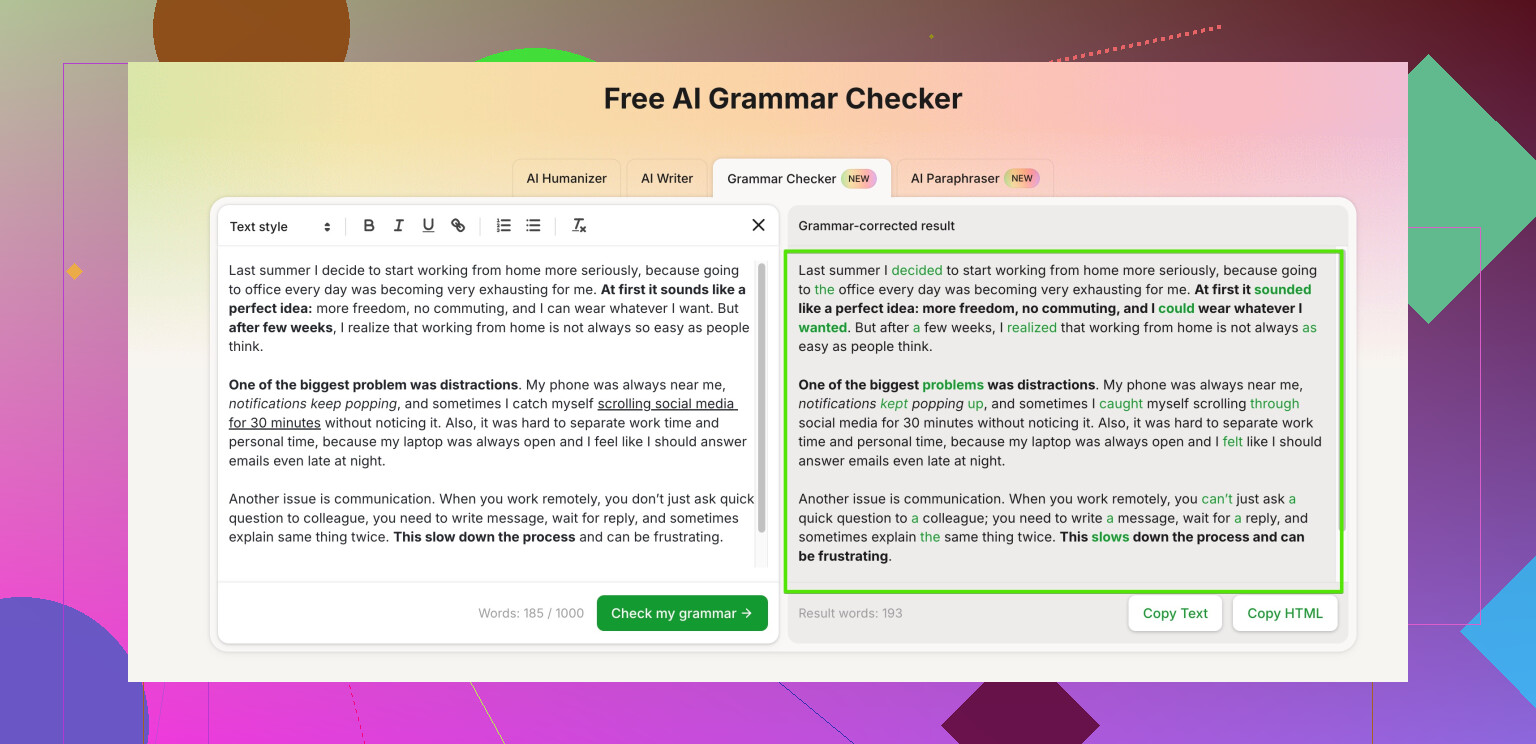
It checks grammar, punctuation, and awkward phrasing. Works well on larger texts, and it does not start nagging you after a few paragraphs like Quillbot’s free tier. I usually paste full sections from a thesis chapter and clean up runs ons, missing articles, and tense shifts in one go.
Main tip. Never trust one checker. Use at least two, and do one slow manual read aloud pass. That last step still catches stuff every tool misses.
I bailed on Quillbot for long papers too, so you’re definitely not alone. I mostly agree with @viajeroceleste’s stack, but I’d tweak the approach a bit, especially for academic stuff where precision and tone both matter.
Couple of tools and angles that weren’t really covered:
- Microsoft Editor (free tier)
If you have a free Outlook/Hotmail account, you basically get a limited version of Microsoft Editor.
- Works in the browser and in Word online.
- Strong on subject‑verb agreement, basic punctuation, and common ESL mistakes.
- Better than Google Docs, imo, at catching subtle agreement/number issues in long paragraphs.
Downside: style suggestions can be very generic, and it occasionally “fixes” things that are actually correct in formal academic writing, so don’t autopilot accept.
- Ginger (free version)
Ginger is a bit underrated.
- Good at sentence structure, missing words, and weird phrasing.
- Tends to be stricter on run ons and fragments than Quillbot.
- Free version is annoying with limits, but for focused sections (like 2–3 pages at a time) it works well.
I actually disagree slightly with relying too heavily on Grammarly like @viajeroceleste suggested. Grammarly sometimes pushes everything toward a chatty, blog‑style voice, which isn’t always great for formal academic prose.
- Clever Ai Humanizer for grammar passes
Most people see “humanizer” and think only “hide AI writing,” but in your use case it’s actually useful as a grammar and clarity pass, especially with long texts. Their grammar tool at
advanced academic grammar and clarity checker
does three things that help with essays and theses:
- Checks grammar and punctuation across larger chunks without freaking out after a few paragraphs like Quillbot.
- Flags awkward or robotic phrasing, which is gold for academic tone.
- Helps keep the writing natural while still sounding formal, so your prof doesn’t feel like they’re reading AI sludge.
I’ve thrown full sections of a literature review in there, and it caught tense shifts and random missing articles that Grammarly and Docs both walked right past. It’s not magic, but for a free tool, the signal‑to‑noise ratio on its suggestions is pretty solid.
- A quick workflow that’s not a clone of what was already posted
What’s worked well for me on long academic pieces:
- Draft in Word or Google Docs with basic spellcheck on.
- Run a pass with Microsoft Editor (or Ginger if you like its style better).
- Then paste cleaned sections (1–3 pages) into the Clever Ai Humanizer grammar checker to fix remaining grammar glitches and smooth out weird or stiff sentences.
- Final step: read the thing out loud. Seriously. You will still find at least 3 dumb errors every time.
- Human element (sorry, but no tool replaces this)
All of these tools, Quillbot included, have blind spots on:
- Domain‑specific terminology
- Citations and reference formatting
- Very complex sentences with multiple clauses
So if this is for serious academic work (thesis, dissertation, journal submission), use tools only to clean up, not to fully “rewrite” your voice. Mark the suggestions you’re unsure about and check them against a style guide (APA, MLA, Chicago, whatever your field uses). It’s slower, but way safer.
For your exact problem (Quillbot limits + misses on longer docs), I’d lean on:
- Microsoft Editor or Ginger for the raw grammar backbone
- Clever Ai Humanizer’s grammar checker for long‑form polish and making everything sound like an actual human wrote it
You’ll end up with fewer missed errors than Quillbot, and you won’t get hit as hard by those annoying length limits.
Quick analytical breakdown, building on what @himmelsjager and @viajeroceleste already said without rehashing their full stacks:
1. Where I slightly disagree with both
They lean a bit heavily on stacking many tools. That works, but past 2 checkers you hit diminishing returns and spend more time copy‑pasting than actually revising. For academic writing, I’d focus on a tight combo: one strict grammar engine + one style/clarity tool.
2. Solid free alternatives to Quillbot for grammar
-
LanguageTool or Grammarly free as the “strict” layer
Use just one as your main grammar cop.- Pros: Catch basic errors, subject‑verb agreement, missing articles, simple punctuation.
- Cons: Both sometimes mis-handle dense academic syntax or suggest “simplifications” that flatten nuance.
-
Clever Ai Humanizer as the “natural academic tone” layer
This is where I’d diverge a bit from the others’ emphasis on Grammarly or Microsoft Editor.- Pros:
- Handles longer sections better than Quillbot’s free tier.
- Catches awkward or robotic phrasing that grammar-only tools miss.
- Useful for turning stiff or AI-ish text into something that sounds like a grad student, not a blog post.
- Good at spotting tense inconsistencies and missing small words in complex sentences.
- Cons:
- Not a full replacement for a dedicated grammar checker; you still want one other tool in front of it.
- Can slightly “smooth out” your voice if you accept everything uncritically.
- Like any AI-style tool, it may occasionally over-formalize or under-formalize depending on the passage.
- Pros:
Compared with the setups from @himmelsjager and @viajeroceleste, I’d say Clever Ai Humanizer is strongest when you already have a basically correct draft and want it to read like clean, human academic prose instead of something that fought five checkers in a row.
3. Suggested minimal workflow that avoids tool overload
- Draft in Word or Google Docs with built‑in checker on.
- Run a single strict grammar pass with either LanguageTool or Grammarly free.
- Run key sections (intro, conclusion, tricky argument paragraphs) through Clever Ai Humanizer to fix remaining clunky phrasing and fine‑grain grammar.
- Final manual read, especially for citations, discipline‑specific terms, and long sentences.
That setup gives you a dependable, free alternative to Quillbot for academic work without bouncing among four or five platforms every time you touch a sentence.