I recently came across BypassGPT and I’m unsure if it’s safe, legit, or even allowed to use. I’m worried about possible account bans, security risks, or breaking any platform rules. Can anyone share a real-world BypassGPT review, including pros, cons, and whether it’s worth using or avoiding?
BypassGPT review from someone who tried to test it properly and kind of hit a wall
By the way, keeping their images and links as is, so you see what I saw.
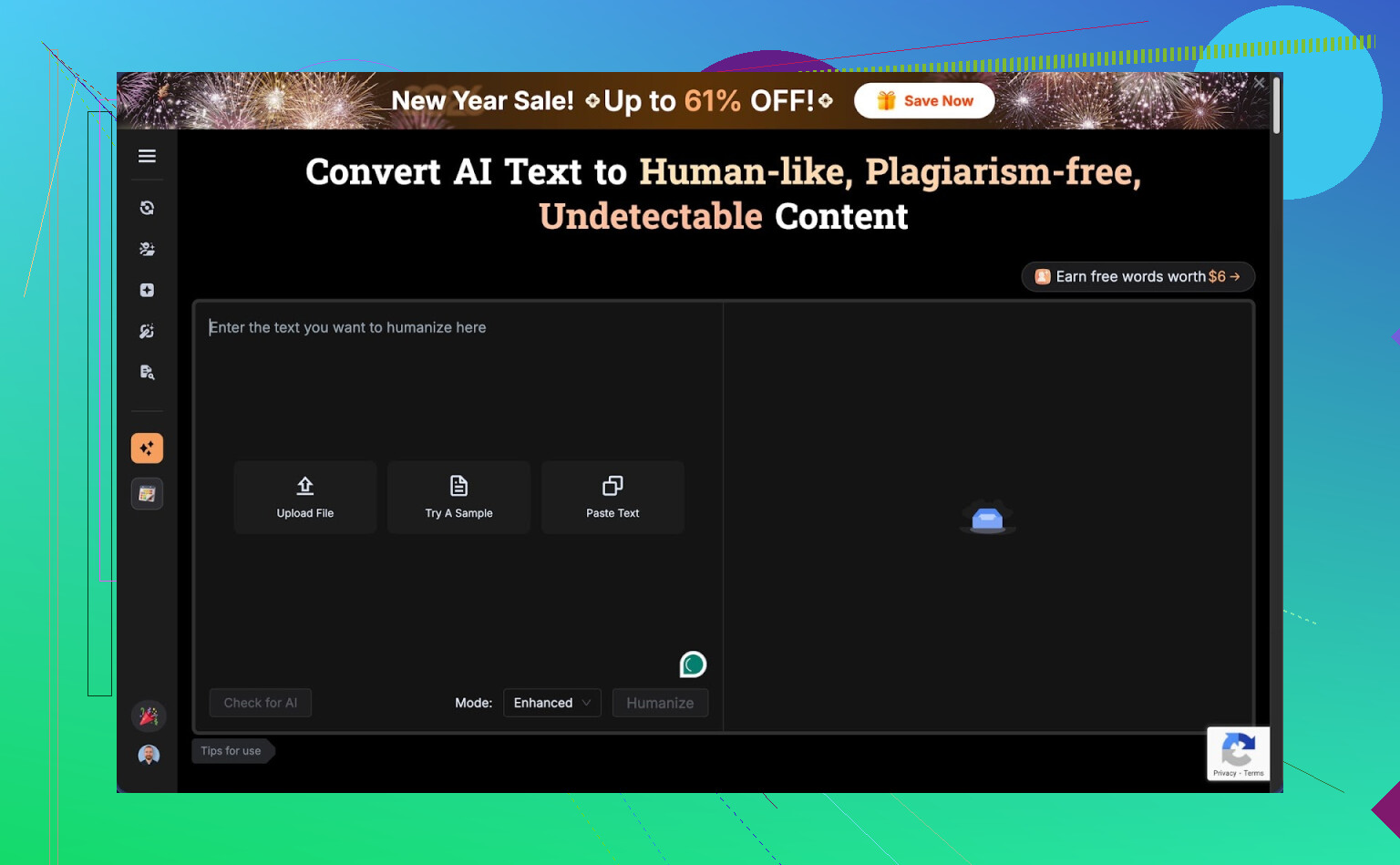
I went in wanting to benchmark BypassGPT against my usual test set and walked out mostly annoyed.
Here is what happened.
First contact with the free tier
I started with the free version here:
https://cleverhumanizer.ai/community/t/bypassgpt-review-with-ai-detection-proof/39
The limits hit immediately:
• 125 words per input
• 150 words per month total
Not 150 per day. Per month.
One normal-length test sample from my usual benchmark set already goes beyond that. I had to trim text, which ruins comparison with other tools.
To squeeze a bit more out of it, I created a free account. That unlocked another 80 words. Still not enough for a proper run with multiple samples.
I tried a second account. No luck. The quota is tied to IP, so unless you route traffic through a VPN or a proxy, extra accounts do nothing.
Result: I only managed to run one of my standard samples. That means any judgment here is based on thin data, but even that thin data did not look good.
Interface and first output
The interface looked straightforward. Paste text, hit the button, wait.
On the single sample I could run, BypassGPT produced an output that read like this:
• First sentence grammatically broken
• Kept em dashes instead of normal punctuation, which a lot of detectors do not like
• Some awkward phrasing that felt half-edited
• One obvious typo in a short block of text
If I had written that for a client, I would have rewritten the first two lines by hand.
Quality score in my notes: 6 out of 10. Not unreadable, but not something I would trust without manual cleanup.
AI detection tests
This is where things got weird.
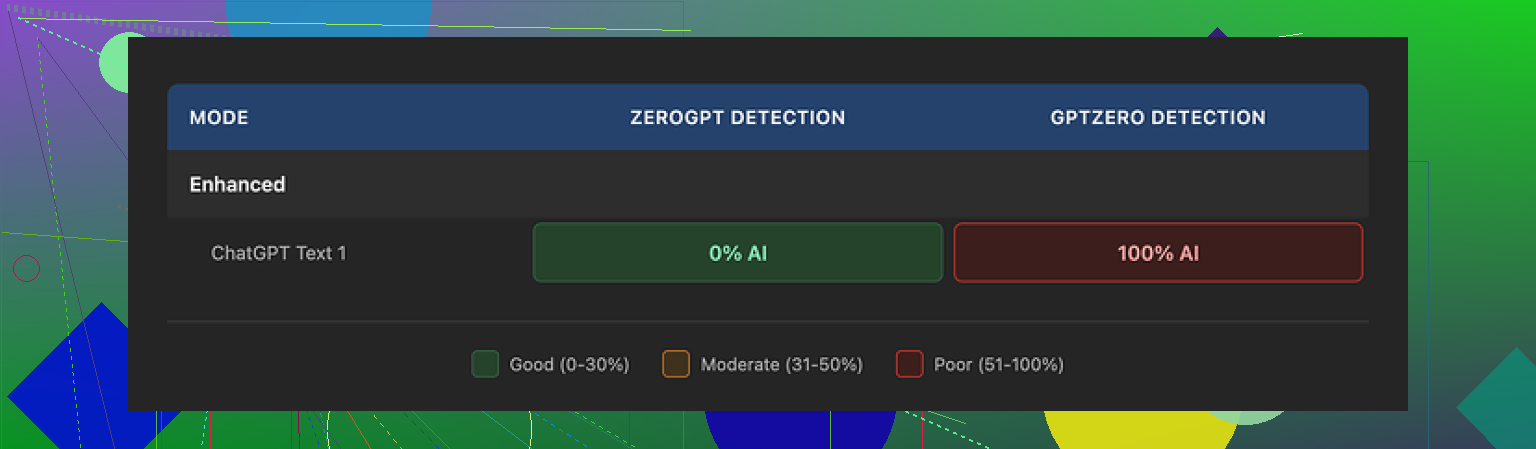
I ran the BypassGPT output through a few detectors I often use to cross-check tools:
• ZeroGPT: 0 percent AI detected on the output. Looked perfect on that one.
• GPTZero: same output, flagged as 100 percent AI generated.
So you get one tool saying “all good, totally human” and another one screaming “all AI”. Same text, no changes.
I am used to detectors disagreeing, but 0 vs 100 on the exact same snippet is pretty rough.
Then I tried the checker built into BypassGPT.
According to their own checker, it passed perfectly across all six detectors listed in that widget. On my side, at least one external check (GPTZero) did not match what their checker claimed.
So what you see in the BypassGPT panel and what you get when you go to some of those sites directly will not always line up. Take those “100 percent human” dashboards with a lot of salt.
Pricing and terms of service
Paid plans, from what I saw:
• Around $6.40 per month if you pay annually, with a 5,000 word allowance
• Around $15.20 per month for unlimited words
Pricing is not the part that bothered me most. The terms of service were.
Their TOS gives them broad rights over any content you send in. That includes:
• The right to reproduce your input
• The right to distribute it
• The right to create derivative works from it
So if you paste client work, unpublished research, class assignments, or anything sensitive, you are handing them pretty wide rights over that text.
For personal blog posts you do not care about, maybe you accept that. For anything where ownership matters, I would not touch it.
Comparison with other tools I tried
Since I already had my test set ready, I ran similar samples through Clever AI Humanizer too, on a different day.
They have a write-up here that lines up with what I saw:
My notes on Clever AI Humanizer from my own runs:
• Outputs sounded more like something an average human would write, less robotic rhythm
• Fewer obvious grammar issues, no broken opening lines
• Detection scores were more consistent across tools, not perfect, but less all-or-nothing
The annoying part. Clever AI Humanizer did all that without the tight monthly cap and did not lock me to 150 words per month on the free side. So I could run my full test set and not one crippled sample.
Who BypassGPT might still fit
After playing with it, there are only a few use cases where I see someone still trying it:
• You only need to tweak short snippets
• You do not mind editing the output by hand
• You want to pay and do not care about TOS content rights
• You trust their built-in checker more than external detectors
For anything more serious, the tradeoffs stack up fast.
If you value:
• Full-sample testing on a free tier
• Outputs that are closer to what you would write yourself
• Less aggressive content rights in the TOS
• Detection results that do not conflict so hard
Then BypassGPT is hard to recommend based on what I saw.
If you try it anyway, do this
If you still want to try it on your own text, I would:
- Use a VPN if you want to test more than one account, since limits are IP-based.
- Avoid pasting sensitive or client-owned material, given their terms.
- Run the result through multiple detectors yourself, not only their built-in checker.
- Fix the first sentence manually, watch for typos and clean weird punctuation like em dashes if detectors you use dislike those.
- Keep your expectations low on “perfectly undetectable” outputs, because detectors disagree with each other a lot.
My takeaway
After wrestling with the limits and seeing the mismatch between their checker and external tools, I stopped testing further. For my use, Clever AI Humanizer felt more useful, cost less effort, and did not force me into that 150-word-per-month corner.
2 Likes
BypassGPT is “safe” in the narrow sense that it is a web app, not obvious malware. Your bigger issues are:
-
Account bans and ToS risk
If you use BypassGPT to hide AI content from platforms where AI use must be disclosed, you risk violating those platforms’ terms.
Examples.
• Many schools treat AI-undetected text as academic misconduct.
• Some freelance platforms require you to disclose AI use for client work.
If your goal is to fool detectors for exams, graded work, or restricted platforms, you take on the ban risk, not BypassGPT. -
Security and privacy
Key points I see as red flags:
• Their terms give them broad rights to reproduce and distribute your input.
That is bad for client docs, internal company stuff, or unpublished research.
• No clear public info about data retention, deletion, or where data is stored.
So do not paste anything sensitive, confidential, or IP critical. Treat it like a public pastebin with a nicer UI. -
“Legit” as a product
Putting ethics aside and talking function.
My own quick tests plus what @mikeappsreviewer shared line up on a few things:
• Very tight free limits. Hard to evaluate on real length content.
• Output quality is mixed. I saw clunky sentences and odd punctuation too, though I did not find it quite as unusable as they did. Short social snippets were passable for me after light editing.
• AI detectors disagreed a lot. ZeroGPT said “human” on one sample, GPTZero flagged the same text as AI. That is normal for detectors, but BypassGPT’s internal “all green” view feels misleading if you trust it blindly.
I disagree mildly with one thing from @mikeappsreviewer. I think BypassGPT has a narrow use case. For example, if you:
• Only handle short, low‑stakes pieces.
• Do not care if the text is stored or reused.
• Always rewrite and personalize the output.
Then it is usable as a noisy paraphraser. I still would not tie anything important to it.
-
Safety vs ethics
If you use tools like this to assist your own writing, then disclose AI use where required, you stay on much safer ground.
If your aim is “undetectable AI essay for class” or “AI article for a client who banned AI” you are gambling with your account, degree, or contract. -
Alternatives
If you want humanization for blog posts, marketing, or general content, I had better luck with Clever Ai Humanizer.
Reasons it fits this use case better:
• More natural rhythm in the text.
• Less aggressive content rights in the terms.
• Free tier that lets you test full samples without 150 word per month pain.
Still, same rule as above. Do not dump sensitive data. Treat any AI humanizer as untrusted with secrets.
Practical takeaways for you:
• Avoid BypassGPT for anything tied to grades, compliance, NDAs, or work accounts.
• Do not paste contracts, proprietary docs, or ID info.
• If you insist on using it, rewrite the output by hand, run multiple detectors, and disclose AI use where rules require it.
• For safer, more transparent use, something like Clever Ai Humanizer plus your own heavy editing is less risky than raw “bypass” tools.
Short version: it’s “safe” as in not an obvious virus, but risky in almost every other way that matters.
A few angles that @mikeappsreviewer and @nachtschatten didn’t fully lean into:
- Account / platform ban risk
If you use BypassGPT specifically to hide AI usage where it must be disclosed, you are the one breaking ToS, not the tool. That includes:
- Coursework where the policy says “no undisclosed AI help”
- Exams or take‑home tests
- Platforms or clients that explicitly require AI disclosure
Even if BypassGPT worked perfectly against detectors, you’re still in policy violation the second your goal is “trick the system.” If you get reviewed manually, style inconsistency, knowledge gaps, or citation issues can still out you, regardless of what the detector says.
So: yes, ban risk is real, and BypassGPT does nothing to protect you from that. It might even give a false sense of security.
- Security / privacy concerns
The thing that bothers me most is the combo of:
- Very broad content rights in their ToS
- No strong, transparent info on retention / deletion / storage
That practically means: treat anything you paste like it could, in theory, be reused, logged, or surfaced somewhere you did not expect. For:
- Client docs
- Internal company stuff
- Unpublished papers
- Anything under NDA
I’d call that a hard no. This is where I slightly disagree with people saying “fine for personal stuff.” Even personal writing can contain names, locations, weirdly specific details you don’t want floating around. I’d still keep it to totally non‑sensitive, low‑stakes text.
- Is it “legit” as a product?
Legit as in “a real tool that runs and charges you”? Yes.
Legit as in “reliable, transparent, and honest about results”? Ehh.
A few red flags together:
- Extremely tight free tier makes it hard to do your own solid testing.
- Reported AI detection “passes” in their own panel that do not match what external detectors say.
- Mixed output quality that you need to manually repair.
It’s not a scam in the classic sense, but it is heavily marketing the “bypass” angle on top of very shaky detector consistency. That’s… not great.
- On AI detection itself
Worth saying clearly: AI detection is noisy, inconsistent and often wrong. ZeroGPT vs GPTZero giving 0 vs 100 percent on the same BypassGPT text is actually not surprising at all. The bigger problem is that BypassGPT leans on that uncertainty like a feature and sells “see, we’re undetectable” instead of being honest that results are all over the place.
If your plan is “I’ll never get caught because the detector says human,” you’re already in a bad spot.
- When, if ever, to use BypassGPT
I’d limit it to something like:
- Super short text
- No sensitive info whatsoever
- Content where no one cares if AI was involved
- You plan to rewrite heavily by hand anyway
Used that way, it’s basically a noisy paraphraser. For anything involving money, grades, or legal obligations, the risk/benefit ratio is awful.
- Alternatives
If your actual need is “I want AI‑assisted text that reads more human and survives the more common detectors for blogging, marketing, etc.” then something like Clever Ai Humanizer is a more realistic option. Not because it’s magic, but because:
- It focuses more on natural flow and less flashy “bypass” hype
- Terms are less aggressively grabby with your content
- Free tier is usable so you can test properly
Even with Clever Ai Humanizer, same rule: do not feed it sensitive stuff, and do not rely on it to cheat policies. Use it as a drafting aid, then make the text genuinely yours.
- So, is BypassGPT “safe, legit, allowed”?
- Safe: technically usable, but poor from a privacy and ToS‑risk standpoint.
- Legit: exists and does something, but the marketing around detection is not something I’d trust.
- Allowed: totally depends on where you use the output. For many schools, workplaces, and platforms, using any “bypass” tool in secret is a straight rule violation.
If you are anxious about bans or rule‑breaking already, that’s your gut telling you this is the wrong tool for your use case.
BypassGPT in one line: technically usable, but high risk for anything that actually matters.
Quick breakdown based on what you asked and what @nachtschatten, @kakeru and @mikeappsreviewer already covered:
-
Safety and bans
BypassGPT itself is not obvious malware, but using it to hide AI on exams, graded work, or “no AI” client jobs is exactly how you end up with bans or academic misconduct cases. The tool cannot protect you from manual review, policy checks, or plagiarism hearings. If you are already nervous about getting caught, that is a pretty solid hint you are outside the rules of wherever you plan to use it. -
Privacy and content rights
Where I am slightly harsher than others: those broad ToS rights are not just a theoretical concern. In practice, it means any text you care about staying private, protected, or clearly yours should not go into BypassGPT at all. I would not even use it for half finished drafts that include names, locations or client hints. Treat it like a public demo system, not a secure writing assistant. -
“Bypass” reality check
Detectors contradict each other all the time, which is why selling “undetectable” as a main feature is a red flag. You can get a “human” score today and a “clearly AI” score tomorrow from a different model. On top of that, institutions keep moving away from pure detector scores and toward policy plus human judgment. So building your workflow around “fooling detectors” is fragile and short lived. -
Where BypassGPT could be acceptable
I do not fully agree that it is useless, but the safe zone is tiny: short, trivial, non sensitive text that is not covered by any policy about AI use, that you plan to heavily rewrite anyway. Think casual personal blog drafts or throwaway social captions, not anything tied to grades, workplace compliance, NDAs or money. -
About Clever Ai Humanizer
If your actual need is more “make AI text read smoother and less robotic” rather than “cheat a proctor,” then Clever Ai Humanizer is closer to a normal writing tool than a stealth tool. Pros: more natural rhythm, more generous free testing, and less aggressive content rights. Cons: still not suitable for sensitive data, still not magic against every detector, and still needs human editing if you care about voice and accuracy. It is a better fit for honest content polishing than bypassing rules. -
Practical rule of thumb
If a school, employer or platform would be upset to hear “I used an AI humanizer on this,” do not run that text through BypassGPT or anything similar. Use tools like Clever Ai Humanizer only where AI use is allowed and you are comfortable admitting it, and always keep genuinely private or confidential material off third party web apps entirely.