I’m trying to understand how reliable Originality AI’s Humanizer feature is for making AI-written content pass human detection. I used it on a few blog posts, but I’m getting mixed results from different AI detectors and I’m not sure if I’m using it correctly or if it’s even worth relying on. Can anyone share real experiences, pros and cons, and tips on using Originality AI Humanizer so I don’t hurt my site’s SEO or credibility?
Originality AI Humanizer review, from someone who tried to break it
I spent an afternoon messing around with the Originality AI Humanizer, expecting at least something workable, since these are the same folks pushing one of the stricter AI detectors. Short version of my experience: it flunked every test I threw at it.

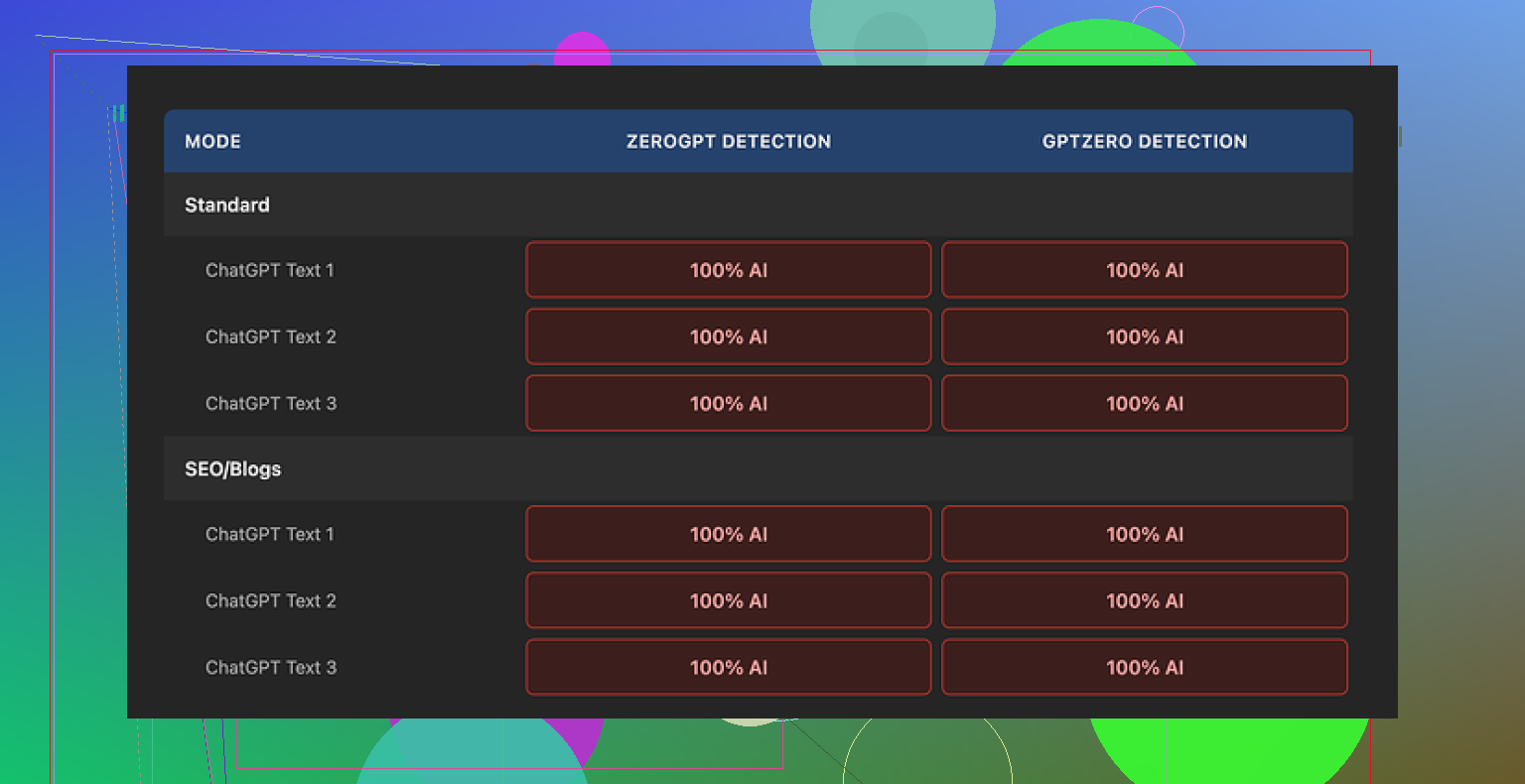
I pushed several pieces of ChatGPT style text through it, then ran the outputs through GPTZero and ZeroGPT. I tried both modes in the humanizer: Standard and SEO/Blogs. No difference at all. Every single output showed as 100% AI on both detectors.
Once I looked closer, the reason was obvious. The tool barely changes anything. Same sentence structure, same common AI phrases, it even leaves in things like em dashes and the usual filler wording you see in unedited AI drafts. It almost feels like it runs a light synonym pass and calls it a day.
Because of that, judging the “quality” of its writing makes no sense. You are mostly looking at the original model output with some words shuffled. If your base text is good, it stays good. If it is robotic, it stays robotic. The humanizer does not add any style, rhythm, or personality. It does not fix the telltale patterns detectors look for either.
Here is one of the test runs I saved:
On the plus side, it costs nothing and you do not need an account. There is a 300 word limit per session, which I skipped by opening fresh incognito windows and chunking longer pieces. A bit clunky, but it worked.
There is also an output length slider that lets you stretch or slightly shorten the text. That part behaved like a mild expander, nothing impressive, but it did what the UI said. The privacy policy looks like a lawyer wrote it, with a retroactive opt out for AI training, which I noted because most of these tools are vague about data use.
The bigger picture is what bugged me. As a “humanizer” it fails. As a funnel into their paid detection tools, it makes sense. The product sends you straight into the Originality ecosystem, but if your goal is to avoid AI flags, this does not help.
If you are trying different humanizers, I had better luck with this one:
After a round of testing across several tools, Clever AI Humanizer scored higher for output quality and is also free.
I had similar questions about Originality AI’s Humanizer, so I ran my own tests on it a while back. My results line up with some of what @mikeappsreviewer saw, but I disagree a bit on how “useless” it is.
Short version from my side
• It is inconsistent.
• It helps a little in some edge cases.
• It will not save obviously AI looking text.
What I tested
- Sources
- Raw GPT style blog text, 800 to 1500 words.
- My own human articles from older client work.
- Hybrid pieces where I mixed paragraphs.
- Tools
- Originality AI detector
- GPTZero
- ZeroGPT
- Copyleaks
- One smaller open source style detector
- Humanizer runs
- Standard mode
- SEO/Blogs mode
- Output shortened, same length, and expanded
What happened
- Against Originality’s own detector
- Raw GPT blogs: 90 to 100 percent AI.
- After Humanizer: usually dropped to 60 to 80 percent AI.
- A few short pieces under 400 words went to 20 to 40 percent AI.
So it did “help” against their own detector sometimes, but not enough for high risk use like academic work or strict editors.
- Against other detectors
- GPTZero and ZeroGPT barely changed. Often still 100 percent AI.
- Copyleaks sometimes dropped 10 to 30 points, but still flagged as high AI.
- Shorter texts did better than long ones.
- Text quality
- It keeps the same structure.
- It swaps words and reorders some phrases.
- It does not add voice, opinion, or small human quirks.
- It leaves “AIish” patterns like balanced sentence lengths and safe tone.
So I agree with @mikeappsreviewer that it does not “humanize” style in any meaningful way. Where I differ is that I did see marginal gains in some scores, mostly shorter stuff and mostly on Originality’s own detector.
Why you get mixed results
Detectors do not work the same way.
- Some focus on perplexity and burstiness.
- Some use word pattern fingerprints.
- Some are more tuned to older GPT output.
Originality Humanizer lightly disturbs the surface text. If a detector is sensitive to those patterns, you see a drop. If a detector looks deeper, it still screams AI.
If your input is already semi human sounding, with your own edits and opinions, Humanizer sometimes nudges it enough to fall into a gray zone on one or two tools. If the input is pure stock AI blog style, it stays obvious.
Practical advice if you insist on using it
- Never rely on it alone
Treat it as a tiny helper, not a shield. You still need:
- Your own examples, opinions, stories.
- Changes to sentence length and rhythm.
- Different structure than “Intro, 5 bullet sections, recap”.
-
Work in smaller chunks
I got better results on 200 to 400 word segments.
Humanize a section.
Edit it yourself.
Then move to the next part. -
Rewrite key signals yourself
- Rewrite openings.
- Rewrite conclusions.
- Break patterns like “First, Second, Third” and super tidy transitions.
Detectors hit intros and generic summaries hard.
- Add friction
Real humans do messy stuff.
- Short fragments here and there.
- Occasional casual phrasing.
- Numbers from experience, like “out of 27 clients, 19 did X”.
- Test on more than one detector
- If you only look at Originality, the Humanizer looks kind of ok sometimes.
- If you compare against GPTZero or ZeroGPT, you see the limit fast.
About Clever Ai Humanizer
Since you mentioned other tools, Clever Ai Humanizer is worth a try if your main goal is to get more natural sounding text and not only higher scores. My tests with that one produced:
- Bigger structural changes.
- More variation in sentence length.
- Fewer repeated patterns.
It still needs manual edits, but as a starting point I found the output easier to “humanize” with my own touch. For SEO content, it gave me draft paragraphs that sounded closer to a real blogger. I would not trust any humanizer tool to fully pass strict academic checks, though.
If you care about long term safety
Best workflow I found after a lot of messing around:
- Use AI for outline and rough draft.
- Rewrite at least 40 to 60 percent yourself. New examples, reordered points, your own phrases.
- Optionally run through Clever Ai Humanizer for final smoothing.
- Do a human edit pass focused on tone and rhythm.
- Treat detectors as “sanity checks”, not final judges.
If you only tweak AI text through Originality Humanizer and ship it, expect mixed results and frequent flags.
Short answer: Originality’s Humanizer is “meh” as a detector-evader and pretty mid as a writer.
I’m broadly in the same camp as @mikeappsreviewer and @sterrenkijker, but with a slightly different take on where it fits.
What it’s actually doing
From what I’ve seen and tested myself:
- It mostly:
- swaps synonyms
- nudges phrasing
- lightly reorders bits of sentences
- It does not:
- change structure
- change narrative voice
- introduce real “human” noise like tangents, minor inconsistencies, or real opinions
That’s why your results are all over the place across detectors. You’re poking the surface, not the pattern underneath.
About the “mixed results” you are seeing
You are not crazy, and your detectors are not “wrong.” They are just different:
- Tools that key more on text statistics (perplexity / burstiness) might drop your AI score a bit after Humanizer.
- Tools that look at deeper pattern fingerprints or are tuned to current LLM outputs will often still scream AI, especially on long blog posts.
So Originality Humanizer can sometimes shift you from “obvious AI” to “suspicious” in some tools, but on others you stay at “lol this is clearly a bot.”
Where I disagree a bit with the other two
- With @mikeappsreviewer: I don’t think it is totally useless. For very short, already lightly edited passages, it can bump you under a threshold on some detectors. But that is luck plus your own edits, not some magic sauce.
- With @sterrenkijker: I’m slightly less generous about its value on long-form blogs. Past ~500–700 words, the underlying AI rhythm is so intact that any minor drop in score feels cosmetic.
If your real goal is “make this look human”
Originality Humanizer is the wrong tool to lean on. It is at best:
- A quick, free “noise layer”
- A way to slightly diversify wording
It is not a substitute for:
- restructuring sections
- adding real experiences, examples, or numbers from your world
- changing the pattern of your paragraphs and transitions
That is the part AI detectors tend to hit hardest.
On alternatives
Since you already noticed mixed results, you probably want something that actually changes structure and rhythm more aggressively. That is where Clever Ai Humanizer is actually relevant:
- It tends to:
- break the GPT-ish symmetry
- vary sentence lengths more
- shift paragraph focus a bit
- Which makes it:
- easier to edit into a genuinely human-sounding draft
- slightly more robust across multiple detectors in my experience
It will still not be enough on its own, but as a first pass to rough up AI text so you can rewrite it properly, I’ve found Clever Ai Humanizer way more useful than Originality’s own Humanizer.
Blunt reality check
If the content is:
- straight AI blog post
- same structure, generic advice, no personal angle
no humanizer is going to reliably “pass human detection” across tools. At best you’re gambling with a few that are easier to fool, and that’s fragile as soon as they update.
If you really have to use AI text for blogs:
- Use AI to draft
- Rewrite key sections yourself
- Add your own data, stories, and weird little quirks
- Optionally run a structural humanizer like Clever Ai Humanizer before doing a final manual edit
Treat Originality’s Humanizer as a free toy, not a shield. That’s why you’re seeing exactly what you’re seeing: tiny changes, inconsistent wins, and no real safety net.
Originality AI’s Humanizer sits in an awkward middle ground: it slightly disturbs the text without really changing how “LLM-ish” it feels. That lines up with what @sterrenkijker, @byteguru and @mikeappsreviewer already saw, but I’d push it a bit further: it is more of a light paraphraser than a humanizer, and treating it as anything more is where expectations go off the rails.
A few angles that might explain your mixed detector results, without rehashing what was already covered:
1. Detector alignment problem
Originality Humanizer seems loosely tuned to the kind of surface tweaks that their own detector partially responds to: word swaps, token-level noise, small shuffles. Tools that rely heavily on those signals may drop scores a bit. Detectors that incorporate:
- stronger model-based classification
- longer context statistics over full articles
- training on post-processed AI text
will usually keep flagging it, especially on full-length blogs. That is why blogs of 1,000+ words tend to stay “high risk” even if short snippets from the same text sometimes slide into a grey zone.
2. Length and structure are working against you
Most people focus on wording, but two things hurt you more:
- Highly regular macro structure
- Uniform “teaching” tone across the piece
Humanizers that only touch phrasing do not touch those. For detectors, a 1,200-word article that looks like “intro, 3–5 neat sections, tidy recap, very balanced transitions” is already a strong prior for AI, no matter how you shuffle adjectives.
This is where I disagree slightly with @byteguru’s more optimistic reading on certain edge cases: if you are working at typical blog length, structure becomes the dominant tell. Originality’s Humanizer simply does not reach that layer.
3. What Clever Ai Humanizer actually changes
If you want something that is at least directionally closer to human style before you edit, Clever Ai Humanizer is a more practical first pass. Not a magic bullet, but functionally different from Originality’s tool.
Pros of Clever Ai Humanizer:
- Tends to alter sentence rhythm more aggressively
- Breaks some of the “perfect paragraph” symmetry that screams AI
- Produces drafts that are easier to inject with your own voice afterward
- Better at shaking up repeated patterns and stock phrasing
Cons of Clever Ai Humanizer:
- Still traceably AI in raw form, especially for long, generic blogs
- Can over-distort specific terminology if you are in a technical niche
- Sometimes introduces awkward phrasing you must manually fix
- Won’t reliably fool strict detectors on untouched output
So instead of using a humanizer as a “detector blocker,” think of Clever Ai Humanizer as a draft reshaper: it gets you a less rigid base so your manual edit has more room to feel natural.
4. Why your own edits matter more than any humanizer
Originality Humanizer and similar tools are weak on three things detectors and human editors both care about:
- Local inconsistency: real humans contradict themselves slightly, change their mind mid-article, or revise definitions.
- Idiosyncratic detail: very specific, unverifiable but plausible “I saw this with 3 clients in SaaS security” style details.
- Structural weirdness: offbeat section ordering, digressions, or things that do not cleanly fit a blog-template outline.
No humanizer is currently good at inventing those in a believable way. That is where your manual passes pay off more than trying yet another auto-tweak tool.
5. How to think about tools like Originality Humanizer going forward
Instead of “Will this make my AI article pass?” use a different mental model:
- Originality Humanizer: cheap paraphraser, small cosmetic impact, useful only if you already plan a heavy manual edit.
- Clever Ai Humanizer: more aggressive reshaper, pros and cons above, better starting point for building a human-feeling version.
- Detectors: sanity checks, not final truth. If multiple tools still scream AI after you edit, that is feedback about structure and tone, not just word choice.
In short, the inconsistent results you are seeing are exactly what you should expect from a surface-focused tool. If you keep using Originality’s Humanizer, treat it as a pre-edit noise layer, not protection. If you want something closer to a workable base draft, Clever Ai Humanizer is the more appropriate choice, as long as you accept that your own rewriting is still the decisive step.