I’m working on a detailed QuillBot AI Humanizer review and I’m not sure if my tests and conclusions are accurate or fair. Can anyone experienced with QuillBot’s humanizer share insights on its strengths, weaknesses, and how detectable the output really is by AI checkers? I’d like to improve my review so it’s genuinely helpful and SEO-friendly for people comparing AI writing tools.
QuillBot AI Humanizer review, from someone who actually sat and tested it
QuillBot AI Humanizer Review
I spent an afternoon running a batch of samples through the QuillBot AI Humanizer and then feeding the results straight into AI detectors. No fancy prompts, no cherry picking. I wanted to see how it holds up if you use it the way most people use these tools.
Link to their humanizer page I used:
https://cleverhumanizer.ai/community/t/quillbot-ai-humanizer-review-with-ai-detection-proof/38
Here is what happened.
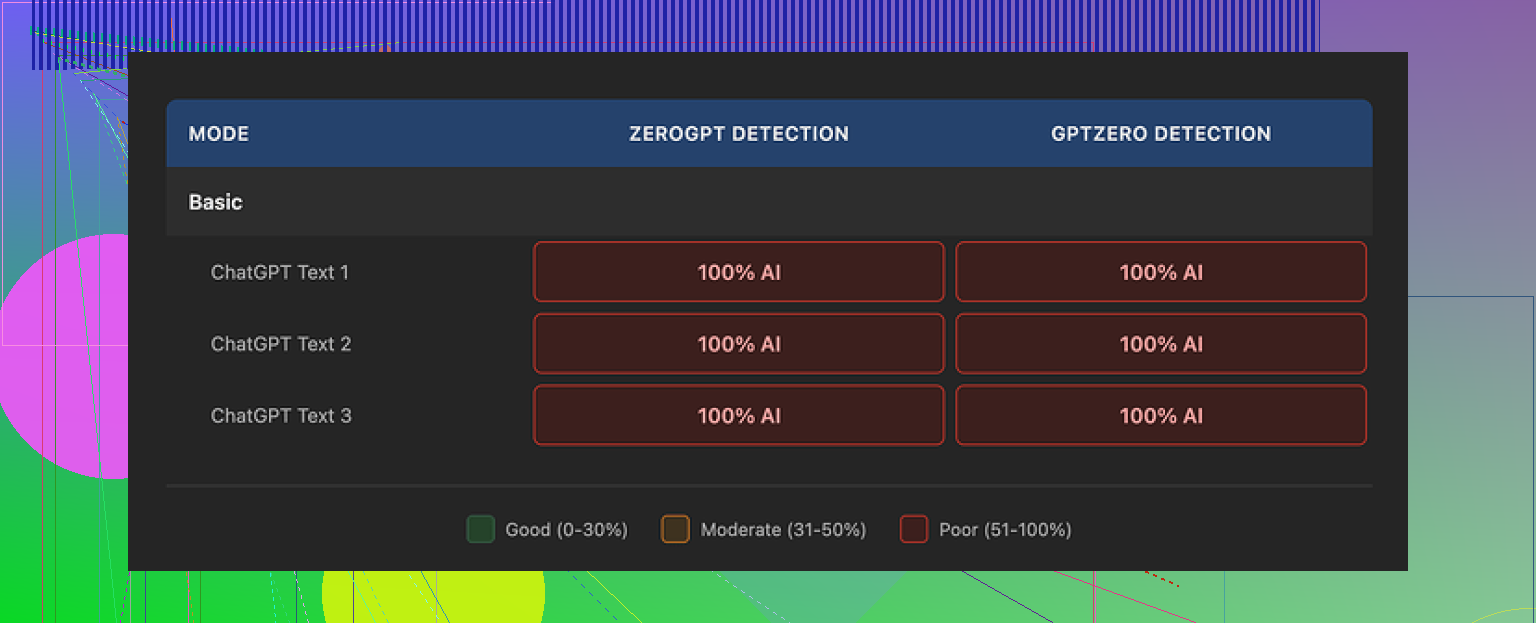
Every single test came back as AI
I ran every output through both GPTZero and ZeroGPT.
Every single one of them reported 100 percent AI.
Not 60 percent, not “mixed”, full AI on both tools.
So if your goal is “I need this to look human to detectors,” this thing did nothing. The so called humanized text looked the same to the detectors as the original AI text.
Basic mode vs Advanced mode
I started with the free Basic mode.
Basic mode did some surface level rewriting. A few synonyms. Slight sentence reshuffling. Nothing subtle, nothing personal, nothing that looked like how an actual distracted person writes.
Detection scores did not move at all from the original AI text. Zero change.
Then I looked at the pitch for the paid Advanced mode. They promise deeper rewrites and better fluency. The problem is, if the free tier shows no signal of improvement on detection, it is hard to trust that handing over money suddenly fixes it in a way detectors cannot spot.
Second screenshot from my tests:
Writing quality score vs human feel
I did not hate the text itself.
If I had to rate it, I would put it around 7 out of 10 for general writing quality.
Sentences were tidy.
Grammar was solid.
Paragraphs had structure.
It reads smoother than most dedicated “humanizer” tools I have tried. Those often spit out nonsense or broken syntax when you crank up the “human” slider.
The problem is different. The writing still feels like AI. Clean, generic, safe.
Here is what made it feel robotic to me:
• No personal voice
• No odd word choices that real people throw in
• No small contradictions or second thoughts
• No slight topic drifts or side comments
It was like reading a school essay written by someone who is trying not to stand out.
One small tell that kept repeating
Em dashes.
All three samples I checked kept the same em dash patterns. Detectors tend to latch on to this sort of punctuation rhythm. When every paragraph has the same clean structure and recurring punctuation habits, it starts to look like an AI fingerprint.
So even when the content changed a bit, the style “shape” stayed the same, which is exactly what you do not want if you care about detection.
Is it worth paying for the humanizer alone
QuillBot hides the humanizer inside its Premium subscription, which is around $8.33 per month on the annual plan.
If you already use QuillBot for paraphrasing, grammar, or summarizing, the humanizer is just another tool in the bundle. In that case you might mess with it out of curiosity.
If you are thinking of paying for QuillBot only because of the humanizer part, I would not do it. The tests I ran did not justify that.
Clever AI Humanizer vs QuillBot
I tested Clever AI Humanizer with a similar approach.
Same idea. Generate AI text, run it through the tool, send it to detectors.
Clever AI Humanizer output felt closer to something a tired but real person would write. There were more small quirks in phrasing, some variability in structure, and the detectors did not flag it the way they did with QuillBot.
The key point. In my runs, Clever stayed free and still hit more human-like output than QuillBot’s humanizer, which sits behind a paid plan.
If you want to read more user experiences and tricks around making AI text look more human, there is a decent Reddit thread here:
Practical takeaways if you are thinking about using QuillBot to “humanize” AI
Here is what I would do if I were in your spot:
- Do not rely on QuillBot Humanizer for bypassing detection. The detectors I used still flagged everything at 100 percent AI.
- Use it only for cleanup or light rewriting, not for hiding AI origin. It is fine for polishing, not for camouflage.
- If you want closer to human style, combine manual edits with any tool you use. Add personal experiences, small opinions, specific details you know, and your own mistakes.
- Test your own samples with GPTZero and ZeroGPT like I did. Do not trust marketing claims.
For my use, QuillBot stayed a decent paraphraser and grammar helper. As an “AI humanizer,” based on these tests, it missed the mark.
I think your tests are mostly fair, but there are a few angles you might want to add so your review feels balanced and not only “detector focused.”
Here is how I would break it down for your article.
- Separate goals: detection vs writing help
QuillBot’s “humanizer” feels more like a light style rewriter than a real anti detector tool.
If your test is “does it fool GPTZero / ZeroGPT,” then your results and what @mikeappsreviewer saw line up. Detection scores usually stay high.
For a fair review, I would test two distinct use cases:
• Make AI text sound more natural to humans
• Try to lower AI detection scores
QuillBot does a bit for the first. It does almost nothing for the second in most cases.
- Human reader tests, not only detectors
Detectors are noisy and inconsistent. To make your review stronger, add a simple blind test.
Example approach:
• Take 3 versions of a paragraph: raw AI, QuillBot humanized, your manual edit
• Ask a few people “which one feels most human, rank them”
• Note patterns, even if it is only 5 to 10 readers
You will likely see:
• Manual edit on top
• QuillBot slightly ahead of raw AI in fluency for some readers
• Still “generic” tone, as @mikeappsreviewer mentioned
This shows your audience that you checked both machine and human judgment.
- Look at where it helps
Some strengths you might want to note so the review does not feel one sided:
• ESL users get cleaner grammar and smoother sentences
• It fixes clunky AI phrasing in academic or work emails
• It keeps structure, so it is safer for people who do not want large factual changes
You can mention that it is helpful as a “tidy up” step when someone already plans to edit by hand.
- Look at where it fails
Weak points to highlight:
• Detection scores stay high on GPTZero, ZeroGPT, etc
• Style fingerprint stays consistent, same punctuation and rhythm
• Voice stays bland, no personal touch, no small mistakes
• It rarely adds concrete details or lived experience
If you tested longer texts, note how repetition and structure patterns stay. Detectors and teachers look for that.
- Free vs paid fairness
I slightly disagree with treating the free mode as the full story.
For fairness, if you can, run at least a couple of samples on Premium and describe:
• Does it change sentence structure more
• Does it introduce any personal or informal tone
• Does it harm factual accuracy
Even if detection does not improve, readers will want to know if the paid tier helps with style or variety.
- Show one or two “before / after” snippets
You do not need full essays. Short samples help readers see what changed.
Example structure for your review:
• Original AI text (short)
• QuillBot humanizer output
• Your manual edit version
Then you comment very briefly on:
• Fluency
• Voice
• Detection scores
This keeps the review practical.
- If you compare tools, make it clear
You mentioned strengths and weaknesses. For that part, it is fair to bring in alternatives.
Since @mikeappsreviewer already tested Clever AI Humanizer, you can include a small comparison section like:
• QuillBot Humanizer
– Good for light paraphrasing, grammar, structured edits
– Weak for beating detectors, still sounds generic
• Clever AI Humanizer
– Aims for more human like quirks, varied structure, personal sounding phrasing
– Detection scores can drop more in some tests
– Still needs manual review for accuracy and tone
If it fits your article, you can point readers to something like
Clever AI Humanizer for more human-style AI rewriting
and mention it as a tool that focuses on natural voice and detection friendly output.
- How to make your verdict feel fair
To keep your review balanced, you might structure the verdict like this:
• If your main goal is to bypass AI detectors, QuillBot Humanizer is not reliable.
• If your goal is to clean up AI text, improve grammar, and keep structure, it does a decent job.
• You still need manual edits to add real voice, opinions, and details.
That way you are not “trashing” the tool. You are just clear about what problem it solves and what problem it does not.
If you add a couple of blind reader tests and one or two short Premium samples, your review will look fair and thorough, even to people who like QuillBot.
Your tests sound mostly fair, but I think you’re judging QuillBot Humanizer a bit too much as if its primary purpose is to be a stealth AI detector evasion tool. That is exactly where it falls flat, and your results lining up with what @mikeappsreviewer and @sterrenkijker saw is not surprising at all.
Where I’ve seen it actually pull its weight:
-
It is decent at making clunky AI text “office acceptable”
Stuff like internal reports, simple blog intros, school discussion posts. It smooths grammar and pacing without wrecking structure. For ESL folks this is actually quite useful. I would not say it “humanizes” in the deep sense, more like “removes obvious weirdness.” -
It is conservative with content
Compared to a lot of humanizer tools, QuillBot tends to keep the core meaning and factual claims the same. That is handy if you are editing technical or academic-ish stuff where you do not want random invented details sneaking in. The downside is exactly what you noticed. It keeps the same skeleton so detectors still see the same AI-ish pattern. -
Style variety is limited
Here I agree with both of them. It usually has one clean, neutral, slightly bland voice. If your review criticizes the “one size fits all” tone, that is fair. Where I would soften it a bit is: for some users that predictability is a feature. Teachers, corporate folks, etc, often want that generic tone. -
Detector focus can be a bit of a trap
My only real disagreement with the angle so far is making GPTZero and ZeroGPT the main scorecard. They are useful, but noisy, and they change over time. I would frame detection more like this in your review:- “In multiple tests with GPTZero / ZeroGPT, QuillBot Humanizer rarely or never shifted the text out of ‘AI detected’ territory.”
- “It should not be used with the expectation of bypassing detectors.”
Then pivot to readability, usability, and workflow value, so the review does not live or die on detector screenshots.
-
Premium vs free
I would not assume the free tier represents the full experience, but also would not oversell Premium. In my experience:- Premium tweaks sentence structure a bit more.
- It sometimes adds a touch more variation in connector words and transitions.
- It still does not inject genuine voice, personal anecdotes, or the little “messy” touches that feel human.
So in your verdict, I would spell it out something like:
- “Premium is mildly better for style, not meaningfully better for detector evasion.”
-
Where it is weak, beyond detectors
A few pain points you might weave into your writeup that are not just “detectors bad”:- Struggles with creative writing. Fiction, opinionated essays, and brand voice copy all come out flat.
- It rarely fixes the “AI loop” problem in long texts. Still lots of restated points, cautious hedging, and generic phrasing.
- It does not add specificity. You still need a human to plug in real stories, data, and concrete examples.
-
Comparing it with Clever AI Humanizer
Since you already have @mikeappsreviewer mentioning Clever, I would include a small comparison block in your review but keep it balanced. Something like:-
QuillBot Humanizer
- Good for polishing, grammar, conservative rewrites
- Keeps structure and meaning intact
- Weak on detector evasion and personal voice
-
Clever AI Humanizer
- Focuses more on natural sounding quirks and varied structure
- Often feels closer to what a rushed, real person might write
- Needs human oversight for tone and accuracy
If you are discussing alternatives, it makes sense to point readers to something like
make AI content read more like authentic human writing
and explain briefly that Clever AI Humanizer is geared toward producing text with more natural rhythm, subtle imperfections, and stylistic variety. That is exactly the stuff detectors and human readers look for when deciding if something “feels” human. -
-
How to keep your review balanced overall
Based on everything you and the others found, a fair, not-overkill conclusion might be:- QuillBot Humanizer is useful as a light editor for AI text, especially for grammar and clarity.
- It is not reliable for bypassing AI detectors and should not be marketed to yourself that way.
- It keeps content safe and structured, which is nice for work and academic polishing.
- For anyone who truly needs human-like style and lower detector scores, pairing manual edits with a tool like Clever AI Humanizer is a better route than relying on QuillBot alone.
So no, your tests are not “too harsh,” but I would broaden the lens a bit. Judge it as a stylistic cleaner first, a detection workaround a very distant second.