My USB drive suddenly stopped opening after I plugged it into my laptop, and now it says the drive needs to be formatted before use. It has important photos and work documents on it that I never backed up, so I really need help with safe USB data recovery options. Has anyone dealt with a corrupted flash drive and found a way to recover files without making things worse?
I ran into this once with a flash drive full of photos, and the first move was to leave it alone.
Do not format it. Do not run CHKDSK. Do not copy new stuff onto it. All three made things worse for me on an older drive, and I ended up with fewer recoverable files after messing with it.
What I’d check first:
- Plug it into another USB port.
- Try it on a second computer.
- See if it shows up in Disk Management on Windows or Disk Utility on Mac.
- Write down the exact popup or error text, especially stuff like “You need to format the disk before you can use it.”
If your computer still sees the drive at all, I’d skip straight to recovery instead of repair.
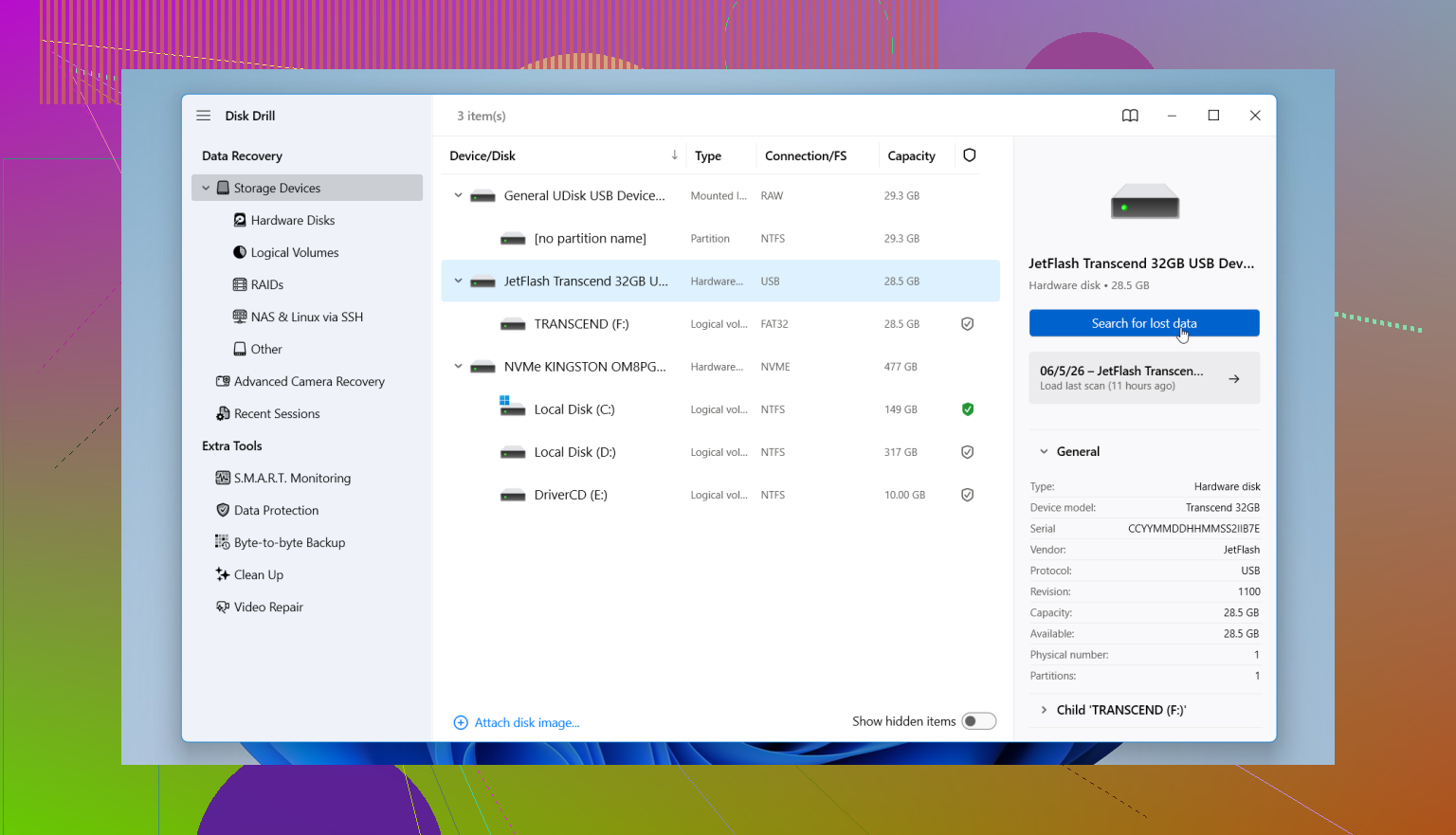
I had decent results with Disk Drill on a damaged USB because it scanned the device even when Windows stopped reading the file system right.
This is the order I’d use:
- Install Disk Drill on your internal drive or another healthy disk, not on the bad USB.
- Connect the problem USB.
- Open Disk Drill and pick the USB from the device list.
- Start the scan and let it finish. Don’t interrupt it early unless the drive starts disconnecting.
- Preview what it finds so you know the files are real and not junk names.
- Recover everything to a different drive.
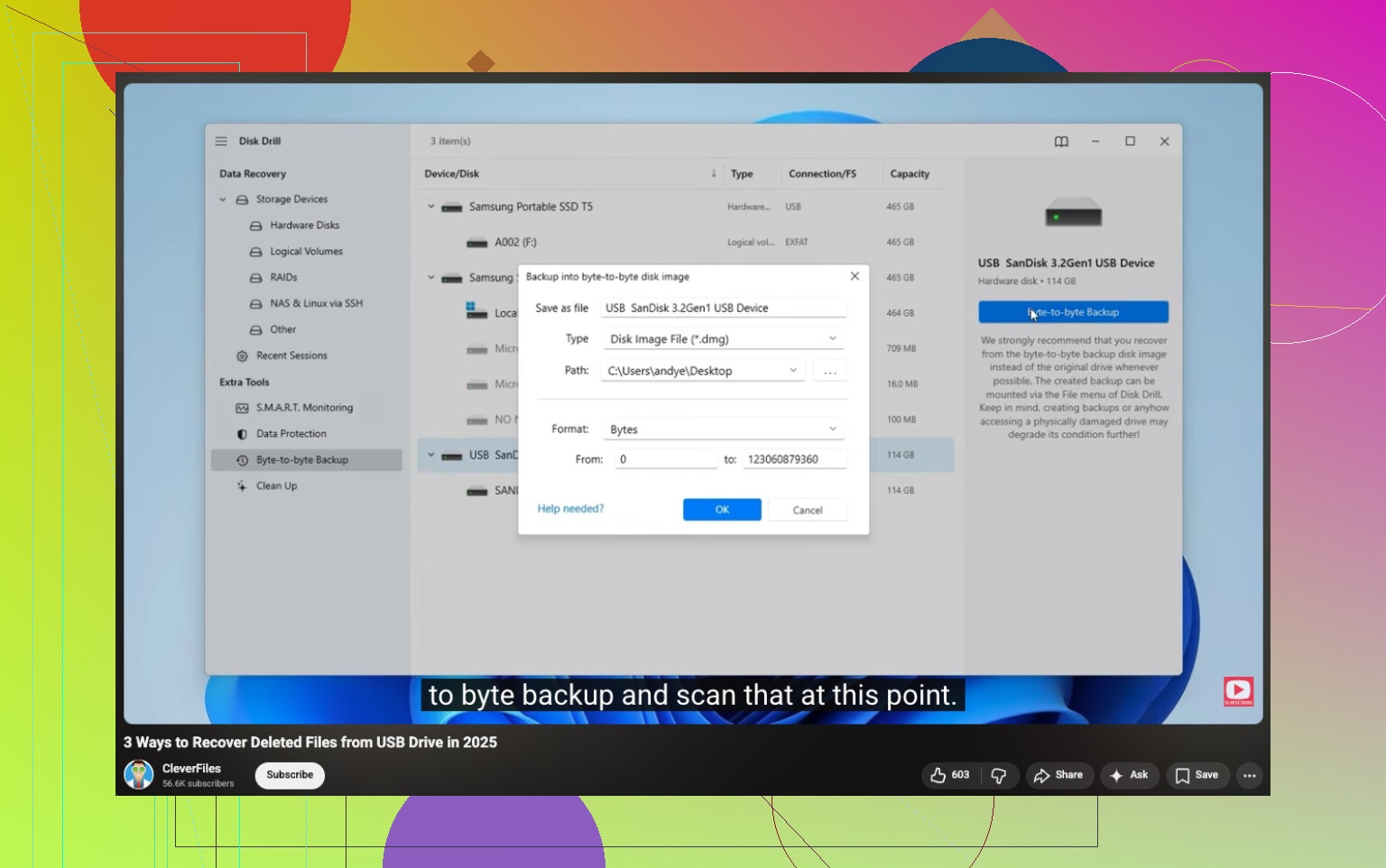
One thing I learned late, and yeah I wish I did it first, if the files matter a lot, make a byte-for-byte backup image inside Disk Drill and scan the image instead of hammering the original USB over and over. Safer move if the drive feels unstable or keeps dropping out.
After your files are off and checked, then deal with the USB itself. Repair it, wipe it, reformat it, whatever fits. Recovery first. Always first.
Do not let Windows format it. That popup often means the file system got damaged, not always the files.
I agree with @mikeappsreviewer on avoiding repair tools first, but I’d add one thing. Check the drive’s size in Disk Management. If your 128GB USB suddenly shows as 0 bytes, no media, or some weird tiny size like 8MB, software recovery gets a lot less promising. That points to controller failure, not a simple file system issue.
My order would be:
- Test on a direct USB port, not a hub.
- In Disk Management, see if it shows the right capacity and a partition.
- If it shows up with normal size, make an image first if possble.
- Scan the image or the USB with Disk Drill.
- Save recovered files to your PC or another external drive.
Small disagreement here, I would not keep retrying on multiple machines if the USB is disconnecting or getting hot. That adds wear and sometimes makes a dying stick worse.
If Disk Management shows RAW, Disk Drill is a solid option for USB data recovery because it reads past a broken file system and often pulls photos and docs by signature scan. Sort results by file type and preview samples before recovery. If filenames matter for work docs, stop using the drive now. Repeated reads lower your odds.
Also, if the files are worth more than the recovery cost, skip DIY and go to a lab.
For a step by step USB data recovery guide, this video is decent:
watch this USB data recovery walkthrough
If you get weird clicking, dropouts, or 0 bytes, post a screenshot from Disk Management. Tha tells a lot fast.
I’d do one extra thing before touching recovery software: check Event Viewer and Device Manager. If Windows is logging I/O errors, controller resets, or “device not migrated” stuff right when you plug it in, that leans more toward hardware trouble than just a busted file system. That matters because people jump into scans too fast and then wonder why the drive vanishes mid-read.
So yeah, I mostly agree with @mikeappsreviewer and @reveurdenuit, but slight disagreement on trying it everywhere. If it already failed once, I would keep testing to a minimum. Every reconnect is another chance for a flaky USB stick to go full potato.
My version:
- Check if it appears in Device Manager
- In Disk Management, note RAW / Unallocated / correct size / 0 bytes
- If it mounts intermittently, that’s a warning sign
- If it gets hot, disconnect it. Seriously.
If the capacity still looks normal, making an image is smarter than scanning the stick over and over. After that, Disk Drill is a legit choice for corrupted USB recovery because it can scan damaged file systems and pull photos/docs without forcing a format. Recover to a different drive only.
If it shows 0 bytes or keeps disconnecting, I’d stop DIY tbh. That’s lab territory.
Also, this thread may help if you want more opinions on the best tools for a bad flash drive: best recovery tool for a corrupted USB drive discussion
Short version: don’t format, don’t “fix” it first, and don’t panic-click random Windows prompts. That popup lies all the time lol.
One extra check I’d do that the others did not really stress: look at the USB in a SMART/USB-info tool if it’s detected at all. Not every flash drive exposes useful health data, but sometimes you’ll catch obvious read error spam or a failing controller before wasting hours scanning.
I slightly disagree with trying a bunch of recovery passes right away. If the stick is old, cheap, or was unplugged mid-write, the safest move is often:
- read-only if possible
- one image attempt
- one recovery pass from the image
- stop
That matters because flash drives can degrade fast once they start acting weird.
If it still reports the correct size and stays connected, Disk Drill makes sense for a first DIY scan. Pros: easy preview, decent photo/doc recovery, can work around a damaged file system, imaging feature is useful. Cons: deep scans can lose original folder structure, it’s not magic if the controller is failing, and scanning unstable media can still stall out.
I’d also add a practical point: recovered Office files and photos should be opened and checked immediately. A file listing means nothing if half the docs are corrupt.
So yeah, @reveurdenuit, @cazadordeestrellas, and @mikeappsreviewer are on the right track overall. My cutoff is simple: if the drive drops, remounts, or changes size between plugs, stop DIY and go pro. That’s usually where home recovery starts making things worse.