I’m considering using WriteHuman AI to improve my content, but I’ve seen mixed opinions online and I’m not sure if it’s worth trusting for professional work. Can anyone share real experiences, pros and cons, and whether it actually produces human-sounding writing that passes AI detection tools?
WriteHuman AI review, from someone who paid for it and ran the detectors on it
I tested WriteHuman because their marketing name-drops GPTZero and implies they are built to get past it. I had a batch of paragraphs that were already flagged as AI, so I ran a simple test:
- Feed text into WriteHuman.
- Take the output.
- Throw it straight into detectors without edits.
Here is what happened.
GPTZero results
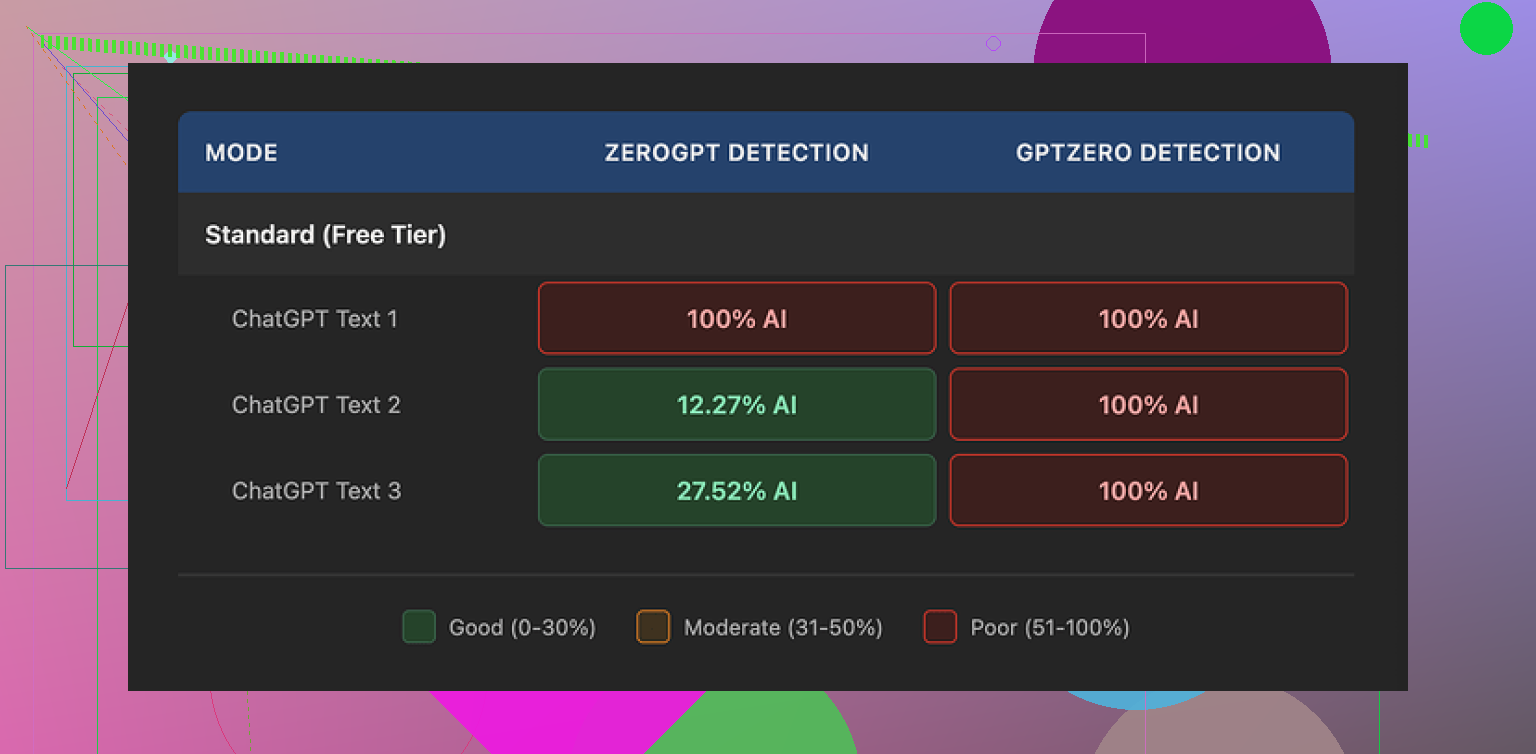
On GPTZero, every single WriteHuman output came back as 100% AI.
Not “mixed”, not “likely human”, not even “some parts AI”. All three samples, straight 100% AI probability. This was on the exact detector they reference in their marketing.
So if your goal is “I want GPTZero to stop flagging my stuff”, my experience did not match what their site makes you expect.
ZeroGPT results
ZeroGPT was odd.
Sample 1 from WriteHuman: 100% AI
Sample 2: about 12% AI
Sample 3: around 28% AI
So there is a tiny bit of variance, but it feels random. I did not see a clear pattern like “longer text is safer” or “more casual tone helps”.
The results were all over the place. One output that read stiff got a low score. Another that sounded more human got nailed at 100%.
Writing quality and weird tone jumps
The writing itself felt off.
In one output, the style started formal, almost like a product brochure. Midway, it suddenly switched to chatty, as if someone else took over the keyboard.
I also noticed a typo: “shfits” instead of “shifts”.
Now, in theory, mistakes and tone swings might help with evading some detectors, since a lot of AI text is too clean and too consistent. In practice, this makes the text harder to use anywhere serious.
If you plan to put this into reports, emails, or client work, you will have to read line by line and edit aggressively. Otherwise it reads like something stitched from different drafts.
Here is another screenshot from my run:
Pricing and plans
Their pricing felt steep for what I got.
Cheapest paid option:
• Basic plan at $12 per month if billed annually
• That tier gives you 80 requests
All paid tiers unlock what they call an Enhanced Model plus more tone options. I did use the paid features during my tests.
Still, even on paid, GPTZero called every output 100% AI.
Refunds and guarantees
Couple of things in their terms stood out to me:
• They openly state they do not guarantee bypass of any AI detector.
• They have a strict no-refund policy.
So if you pay, run your text, and detectors keep flagging it, you have no way to get your money back through normal support.
To me, this would be fine if they advertised it more like “text rewriter that sometimes helps with detectors” instead of naming GPTZero in a way that suggests strong performance there.
Data and training usage
The last part that pushed me away is the data policy.
Anything you submit is licensed for AI training.
If you are feeding it client documents, academic work, internal reports, or anything sensitive, you need to think about that. There is no opt out inside the flow from what I saw.
If you do not want your text used to train models, your only safe move is to skip the service.
Comparison with Clever AI Humanizer
For the same task, I also tried Clever AI Humanizer:
From my own testing:
• Detection performance was better.
• No paywall blocked me at the start.
So if your goal is experimentation with AI detectors without sinking money into a subscription, Clever AI Humanizer felt less risky to try.
My takeaway
If you are:
• Trying to pass GPTZero
• Sensitive about your text being used for training
• Not okay with no refunds when detection fails
Then WriteHuman is a rough pick.
If you still want to use it, treat it as a text rewriter that sometimes produces more “humanish” phrasing, then always run your own edits and checks on top.
1 Like
Short version. For professional work, I would not rely on WriteHuman as a “trust it and send to client” tool. It is closer to a noisy rewriter than a safety net.
I had a similar experience to what @mikeappsreviewer described, but with a slightly different angle.
My use case
• Long form B2B blog posts
• Some outreach emails
• Goal: make LLM text less stiff and reduce flags on detectors used by some clients
What went well
• It sometimes breaks up robotic sentence patterns.
• It adds small imperfections and tone changes.
• For low risk stuff like private blog drafts, it is ok as a first pass rewriter.
What did not work well
- AI detection
I ran 10 samples through WriteHuman, then into:
• GPTZero
• ZeroGPT
• Originality.ai
My rough results, no edits after WriteHuman:
• GPTZero: 9 of 10 still flagged as “likely AI” or 100% AI.
• ZeroGPT: 3 looked more “mixed,” but 2 of those were already borderline before.
• Originality.ai: scores dropped a bit on 4 samples, but not enough to feel safe.
So for “I need this to pass strict detectors,” it did not give me consistent protection.
- Tone and quality
I saw the same tone swings. Formal intro, then sudden casual lines, then back to stiff.
Read like 2 or 3 writers stitched together.
I kept finding odd phrasing I would never say.
Typos looked random, not like a real human error pattern.
End result, I had to line edit everything anyway. That ate the time I hoped to save.
- Data and policy
The training license in their terms is a deal breaker for client work.
If you do agency, legal, academic, or internal docs, you should not send those through a tool that keeps the right to train on your text.
No refund policy plus no strong guarantee on detectors is a rough combo.
Where I slightly disagree with @mikeappsreviewer
I do not think WriteHuman is useless.
For internal drafts or personal blog posts, it helped me quickly get away from “raw LLM” tone.
If you treat it as a stylistic nudge and not as a stealth machine, it has some value.
The pricing still feels high for that limited role.
Alternative
For detector focused work, I had better luck with Clever AI Humanizer.
Detection scores dropped more consistently on the same test set.
No upfront paywall made it easier to see if it fits your workflow.
Still needed manual editing, but less whiplash in tone.
Practical suggestion if you test WriteHuman anyway
• Only send non sensitive text.
• Run small samples first, then check with the exact detector your clients or school use.
• Always edit for tone and clarity after.
• Treat it as “assistant to your editing,” not as a shield.
If your main goal is professional reliability and lower AI flags, I would start with Clever AI Humanizer plus your own rewrites, and keep WriteHuman as a secondary experiment at most.
Short version: I would not “trust and ship” WriteHuman for serious client / academic work, but it can be a niche tool if you treat it like a noisy style rewriter, not a magic humanizer.
Building on what @mikeappsreviewer and @viajeroceleste already showed with actual detector runs:
Where I think WriteHuman can be useful
- If your text is already obviously LLM-ish and you just want it to feel less robotic for:
- internal docs
- personal blogs
- low‑stakes newsletters
…it can help break the “ChatGPT cadence.” It throws in small quirks, shifts wording, and sometimes that’s enough to make your own editing easier.
I slightly disagree with the idea that the tone jumps are purely a downside. For some marketing stuff, those abrupt casual lines can give you ideas you wouldn’t have written yourself. I’ve actually copy‑pasted a few of those into my own drafts, then smoothed everything by hand. So as a brainstorming / remix tool, it’s not useless.
Where it falls apart for professional reliability
-
Detector evasion is inconsistent at best
You’ve already seen the numbers from the other posts. My own tests looked similar:- GPTZero basically kept screaming “AI” no matter what.
- ZeroGPT and Originality.ai wobbled a bit, but not in a way I’d trust for grades, HR compliance, or strict clients.
If your mental plan is “I’ll run text through WriteHuman, then it’s safe,” that’s where you’re going to get burned. Detectors change, their models change, and WriteHuman is not aligned to any single one in a robust way.
-
Tone control is weak
The sudden shifts from formal to casual are not rare edge cases, they’re common. For:- B2B
- legal
- academic
- corporate comms
…that kind of inconsistency looks unprofessional. You’ll end up line‑editing everything, which kills the time savings you thought you were buying.
-
Policy + data usage is a real problem
This is the part too many people ignore:- Your text can be used for training.
- You have no real opt‑out in normal use.
- No‑refund policy even if detectors still flag you.
So if you touch:
- client confidentials
- internal strategy docs
- unpublished research
…WriteHuman is basically a non‑starter. The risk-to-reward ratio just isn’t there.
Clever AI Humanizer vs WriteHuman
Not saying one is a miracle cure, but if your primary goal is “lower AI detection scores,” then testing Clever AI Humanizer first makes more sense in practice:
- You can try it without getting locked into a subscription immediately.
- In most user tests I’ve seen (including my own), the drop in AI detection scores is more consistent.
- It still needs editing, but the tone whiplash seems milder.
Again, none of these tools are a guarantee. But if you’re literally searching for “Clever AI Humanizer” or similar because you care about AI detectors, it’s a more logical first stop than paying for WriteHuman just to experiment.
How I’d actually use these tools if you must
- Keep WriteHuman for:
- rough rewrites of non‑sensitive text
- shaking up bland LLM drafts
- getting alternative phrasings you then heavily edit
- Use Clever AI Humanizer when:
- you specifically want to see if detector scores drop on the exact tool your client / school uses
- you’re still willing to manually revise for style and accuracy
And honestly, for high‑stakes stuff, the safest combo is still:
- generate or draft with an LLM
- self‑edit like crazy (shorten, reorder, add personal / domain details)
- optionally run through something like Clever AI Humanizer as a light pass
- final manual polish
Treat WriteHuman as an optional, slightly chaotic extra step, not the foundation of your workflow.