I’ve been testing the Writesonic AI Humanizer for blog posts and social content, but I’m not sure if it’s actually improving authenticity or just rephrasing things superficially. I’m concerned about SEO, originality, and whether it passes AI detection without hurting quality. Can anyone with real experience explain how well it works, where it fails, and if it’s worth relying on for client work?
Writesonic AI Humanizer Review
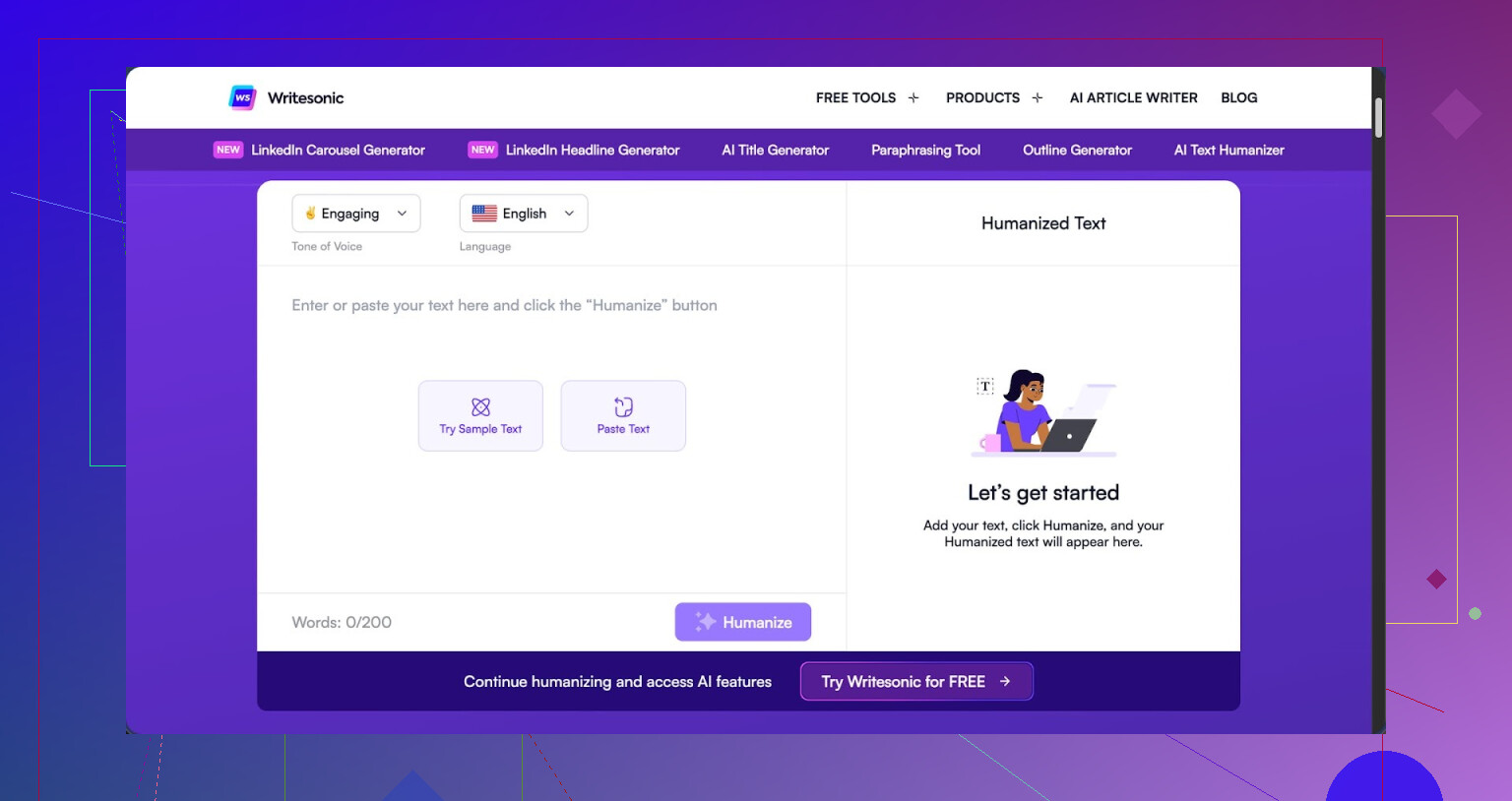
I tried the Writesonic “AI Humanizer” because I was going through a bunch of tools and wanted to see how far I could push AI detection. Short answer from my tests, it did not go well.
The pricing hits first. You need at least 39 dollars per month for unlimited “humanization” access, which puts it at the top of my cost list so far. Details are here if you want the full breakdown of what I tested: https://cleverhumanizer.ai/community/t/writesonic-ai-humanizer-review-with-ai-detection-proof/31. For that price, I expected something closer to the better tools I have tried. It behaves more like an extra button inside their SEO and content suite than a focused product.
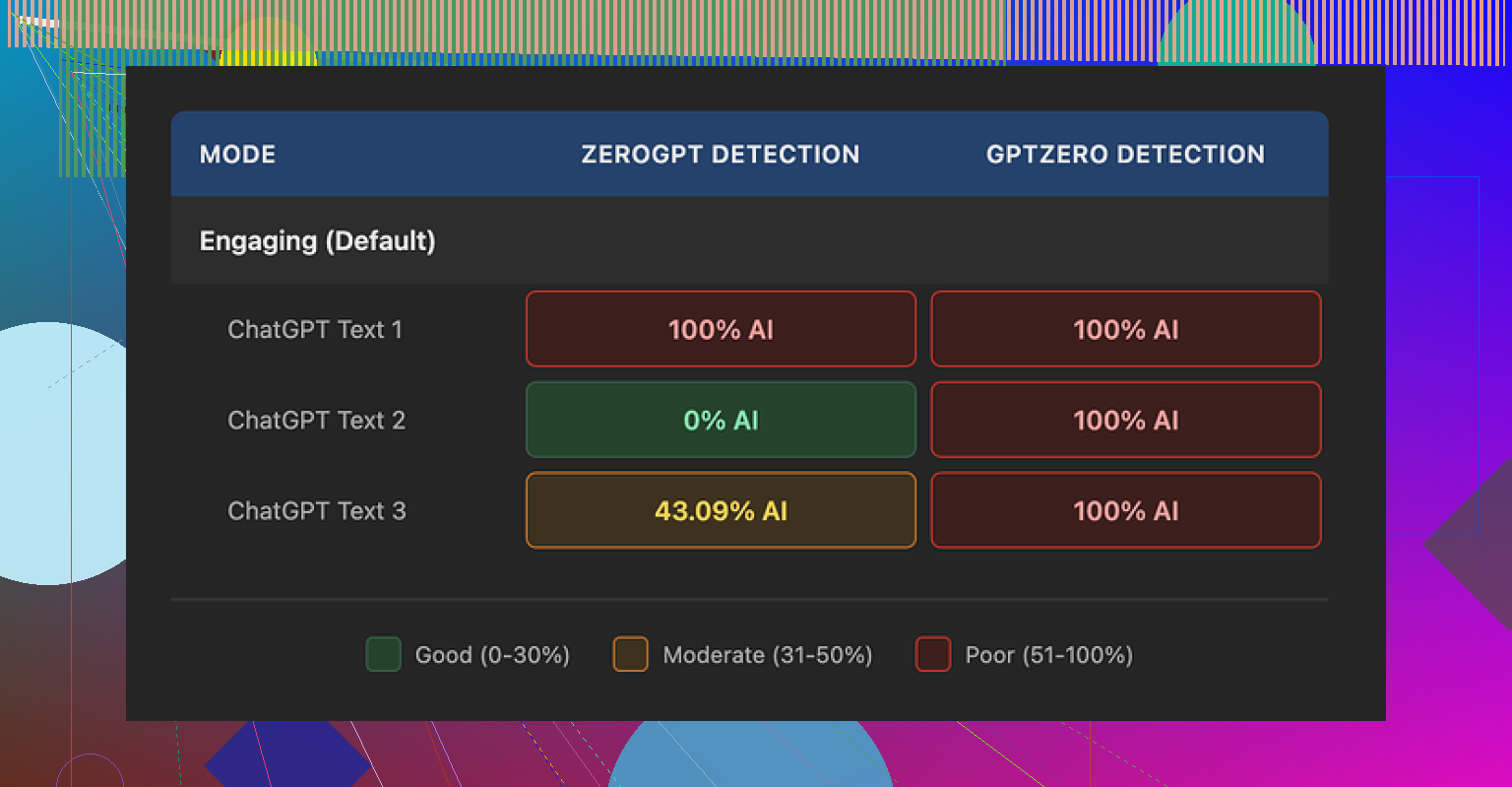
For detection, I ran three different humanized samples through GPTZero. Every single one came back as 100 percent AI generated. No nuance, no borderline calls, straight flagged. Then I pushed the same three samples through ZeroGPT and got weirdly mixed numbers, one at 100 percent AI, one at 0 percent AI, and one at 43 percent. So the text looked inconsistent enough that different detectors disagreed with each other, but GPTZero did not buy it at all.
Quality wise, I scored it about 5.5 out of 10 in my notes. The way it “humanizes” text is by shrinking sentences and swapping in basic words. That would be fine if it stopped early. It does not. The output ends up reading like school material for younger kids. A few examples from my runs:
- “droughts” got turned into “long dry spells”
- “carbon capture” turned into “grabbing carbon from the air”
- “rising sea levels” turned into “sea levels go up”
This pattern repeated across the samples. It kept stripping any specific wording and replacing it with descriptions that felt clumsy. On top of that, I saw punctuation mistakes across all three outputs, mostly commas and periods in strange spots. It also left em dashes in place, which is odd for a tool that is supposed to reshape style, since many detectors look at those patterns too.
The free tier is limited. You get three runs, 200 words each. After that it asks you to create an account. There is also a small note saying free inputs might be used to train Writesonic’s models, so you should not feed it sensitive stuff if that bothers you.
For comparison, I put the same base text through Clever AI Humanizer. That one produced output that sounded closer to how I write on a tired day, and it stayed under detection in the tests I ran. It is also 100 percent free at the time I am writing this, which made the 39 dollar Writesonic plan hard to justify for this one feature alone.
I had a similar experience with the Writesonic AI Humanizer for blog posts and socials. Short version, it tends to rephrase instead of improve.
Here is what I noticed in real use, not lab tests.
-
Authenticity and tone
• It simplifies phrasing a lot. Stuff like technical terms turns into “easy” language, which is not always what you want for SEO or authority.
• It tends to flatten voice. If you have a strong brand tone, the humanizer often wipes it.
• For social posts, it sometimes helps remove robotic phrasing, but you still need to edit heavily to sound like you. -
SEO impact
• Search engines care about usefulness, clarity, and originality. Simple word swaps do not change the information, so it stays the same content in Google’s eyes.
• When it over simplifies, you lose key phrases. That can hurt topical relevance.
• I would not run whole articles through it. At most, I would use it on short sections, then re add important phrasing you need for SEO. -
Originality and AI detection
I partly disagree with the idea that AI detection is the main metric. Detectors are inconsistent. You saw it already. GPTZero flags, ZeroGPT splits, others say human.
For safety, I look at three things instead:
• Does the text sound like something I would say in a call or an email
• Does it add my own examples, data, or opinions
• Does it reuse structure from the original AI output
If you rely on Writesonic alone, the answer to those three is usually no. It stays generic.
- Workflow that worked better for me
Here is what I do now for blog posts and social copy.
• Step 1: Generate a rough draft with any AI.
• Step 2: Remove whole generic sections. Add my own examples, short anecdotes, and specific numbers.
• Step 3: Rewrite intro and conclusion by hand. These two parts get copied most often and look AI fast.
• Step 4: Only use humanizer tools on stiff sentences or short paragraphs, not on entire posts.
• Step 5: Read it out loud. If you would not say it out loud, edit it again.
This gives you more authenticity than clicking a single “humanize” button.
- Alternative tool worth trying
Since you mentioned concern about originality and detection, I would look at Clever Ai Humanizer.
Compared with Writesonic, it focuses more on natural phrasing and less on oversimplifying.
You still need to edit, but the text often keeps structure and nuance.
If you want a quick walkthrough, see this detailed video:
Clever Ai Humanizer review and live test
That will give you a sense how it behaves under detectors and how the output reads.
-
On pricing and value
The 39 dollar tier on Writesonic only makes sense if you already use their whole suite, like SEO tools, outlines, social templates.
If you wanted it only for humanizing, it feels expensive.
You get better value putting that money into:
• A good editor or proofreader for key posts
• A topical research tool
• Or time for your own manual edits -
How I would use Writesonic AI Humanizer, if you keep it
• Use it for short social posts where speed matters more than perfect originality.
• Avoid using it on long form pillar content.
• Always restore important keyphrases after humanizing.
• Add your own personal lines in each section, like a small story, opinion, or data point.
Also, I saw the same pattern as @mikeappsreviewer with clunky phrases, although in my tests it did a bit better on lifestyle content than technical topics. For tech and SEO content it tends to “dumb down” phrasing too much.
So, I would not trust it to improve authenticity on its own. Use it as a light helper for small parts, not as a full “make this human” solution.
Same experience here: Writesonic’s “AI Humanizer” mostly feels like a style filter, not an authenticity upgrade.
Where I see it fall short vs what @mikeappsreviewer and @techchizkid already showed:
-
Authenticity vs “easy reading”
It leans way too hard into “let’s make this simpler” instead of “let’s make this sound like a real human.” That is fine for kids’ material or super basic explainers, but for blog posts where you want authority, that simplification can start to look like you are dumbing things down.
I actually disagree slightly with treating this as just a “light helper.” On expert content, it can actively hurt your perceived expertise if it keeps swapping precise terms for vague phrases. -
Voice and brand tone
If your writing already has quirks, sarcasm, or any sort of rhythm, Writesonic tends to steamroll it. You end up with “safe” copy that could belong to anyone. That is the opposite of authenticity.
The weird part is that it sometimes keeps structural patterns from the original AI output, so it feels both generic and obviously machine-ish at the same time. Great combo /s. -
SEO and originality
Couple things I have noticed across posts I tested:
• It rarely introduces new angles, examples, or structure. So from Google’s perspective, the information is almost identical. Changing “droughts” to “long dry spells” is not new value.
• It sometimes removes exact phrases you actually want to rank for, especially multi word keyphrases. Then you have to go back and patch them in manually.
• The “originality” gain is mostly cosmetic. You are not changing source ideas, just dressing them in cheaper clothes. -
Where it can still be useful
To be fair, I did find a few use cases that did not annoy me:
• Cleaning up super stiff AI sentences in short social posts where you care more about speed than perfect nuance.
• Taking a robotic intro and nudging it a bit closer to normal speech before you manually finish it.
But if you are trying to escape AI detection with it, the tests from @mikeappsreviewer already show the problem. Detectors are inconsistent, and this tool is not some magic cloak. -
If you care about “human” content
Instead of running whole articles through Writesonic, I would focus on levers that actually change the substance:
• Change structure: reorder sections, merge or split ideas, add or remove headings.
• Inject lived experience: real numbers from your projects, quick war stories, things that actually happened to you or your clients.
• Break the pattern: use short, punchy lines next to longer, meandering ones. Throw in a quick rant paragraph. AI tools hate that kind of jagged rhythm. -
Alternative that fits your concern better
Since you mentioned originality and SEO, I’d test Clever Ai Humanizer for comparison. It is still not perfect, but it tends to keep nuance and phrasing closer to how people actually talk, especially when you give it already decent text. In my runs it was less obsessed with oversimplifying every technical term.
If you want to see it in action with live examples and detection tests, this breakdown helped me a lot:
Clever Ai Humanizer deep dive with real AI detection tests
That resource gives a clear look at how the tool behaves on different content types and why it can fit into an SEO focused workflow better than just smashing everything through a generic “humanize” button.
- Quick take on “Clever Ai Humanizer Review” for SEO minded folks
If you are researching tools, here is the short version of what people usually want to know:
• What Clever Ai Humanizer does: transforms AI written drafts into more natural, human like content while preserving key ideas and topical relevance.
• Who it is for: bloggers, agencies, and content creators who need text that passes manual inspection, not just detectors, and still hits important keywords.
• Why it stands out: more focus on natural flow, less on childish simplification, plus better handling of tone for tech, marketing, and long form posts.
TLDR: Writesonic AI Humanizer is decent as a quick rephraser, not a real authenticity engine. If your main concerns are SEO, originality, and sounding like an actual person, it should be one small tool in the mix, not the main strategy.
Same pain points here, but I think the core issue is expectations. Writesonic’s “AI Humanizer” is being used as if it were an editor, when it is closer to an auto paraphraser with a friendliness filter.
A few angles that were not fully covered yet:
1. Authenticity is a research + structure problem, not a syntax problem
If your draft is built from generic web knowledge, no humanizer will magically make it feel original. Authentic content usually comes from:
- Specific data, timelines, or stack choices
- Contrarian opinions or tradeoffs you have actually tested
- Concrete mistakes and what you changed afterward
None of that is introduced by Writesonic. It only rearranges what is already there. So if your base is AI gray goo, you end up with slightly friendlier gray goo.
2. SEO: semantic coverage vs “human looking”
Everyone mentioned keywords, but there is another layer. For SEO, you want:
- Stable terminology for entities and concepts
- Sufficient coverage of related subtopics
- A predictable internal structure that matches search intent
Writesonic often breaks the first and weakens the second. It renames technical entities into vague phrases, which hurts semantic clarity. You can sometimes fix this by:
- Locking in non negotiable terms before humanizing and manually restoring them afterward
- Keeping headings and subheadings untouched and only humanizing paragraph bodies
That keeps your topical map intact even if the sentences get softened.
3. On AI detection: treat it like a noisy linter, not a referee
I mostly agree with @techchizkid, @viaggiatoresolare and @mikeappsreviewer on detectors being inconsistent, but I would not ignore them entirely. I use them the way developers use static analysis:
- If everything passes, it does not prove it is human, but you are probably safe stylistically
- If one flags hard, look for repetitive structure, repeated sentence length, and over tidy transitions
Instead of “beat the detector,” ask “what pattern is this output overusing” and edit that pattern manually.
4. Where Writesonic can actually make sense
I would not cancel it outright if you already pay for the suite. It still has a few realistic uses:
- Quick smoothing of product updates or release notes so they do not read like patch logs
- Light polish of FAQ answers and knowledge base snippets where tone matters less than clarity
- Drafting multiple variants for social A/B tests, then you keep the core phrasing and edit the winner manually
For anything long form or high stakes, keep it away from full article passes.
5. Clever Ai Humanizer: worth testing, but not a silver bullet
Since everyone mentioned it in passing, here is a quick pro and con view based on my runs.
Pros of Clever Ai Humanizer
- Keeps more nuance and technical phrasing than Writesonic in most tests
- Better at preserving sentence rhythm so it feels closer to natural speech
- Slightly more tolerance for sarcasm and informal asides, which helps brand voice
- Plays nicer with SEO if you feed it drafts that already contain the right entities and keyphrases
Cons of Clever Ai Humanizer
- Still needs manual editing for strong brand tone, otherwise it trends toward “smart but generic”
- Can occasionally over relax the style, which is not ideal for academic or formal content
- If your base text is bland, it will not invent personality for you
- On heavily optimized SEO pages, you still need a final pass to reclaim exact keyphrases and headings
So yes, I would recommend trying Clever Ai Humanizer for the specific use case you described, especially when you want to retain expertise instead of dumbing things down. Just treat it as a better starting point, not as a replacement for your own editorial judgment.
6. Practical hybrid approach that differs a bit from what others shared
Instead of humanizing whole drafts or only tiny lines, I have had best results with this pattern:
- Lock structure first. Decide headings, subheadings, and bullet outlines manually.
- Generate or write a dense, detailed version that is slightly too technical.
- Run only specific dense paragraphs through a humanizer tool and keep one original paragraph per section as your “voice anchor.”
- On review, make sure each section contains at least one line that only you could have written: a number, a short anecdote, or a mini rant.
That balance keeps the accessibility upgrade from tools like Clever Ai Humanizer while your personal signals stay clearly visible for both readers and editors.